

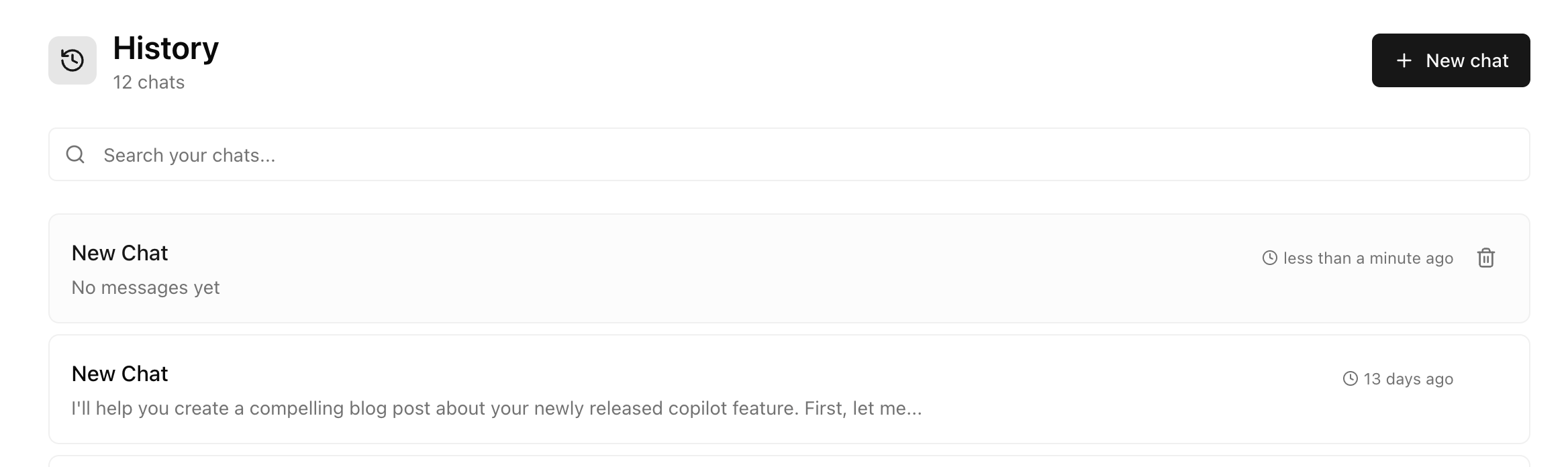
Accessing history
Open the History tab in Copilot to see all your past conversations. Conversations are listed with:- Title — Auto-generated based on the conversation topic
- Preview — First few lines of the conversation
- Date — When the conversation took place
Finding conversations
Search
Use the search bar to find conversations by keyword. Search looks through:- Your messages
- Copilot’s responses
- Generated content
Filter by date
Filter conversations by time period:- Today
- Last 7 days
- Last 30 days
- All time
Continuing conversations
Click any conversation to reopen it. You’ll see the full history and can continue right where you left off. This is useful when you want to:- Iterate on content — “Actually, make that LinkedIn post more casual”
- Get follow-up feedback — “How did that blog post I wrote last week perform?”
- Build on previous work — “Create a Twitter thread from that email copy”
Editing conversations
You can edit messages in past conversations to:- Refine your prompts — Change what you asked and regenerate Copilot’s response
- Try different approaches — See how Copilot responds to a different request
- Fix typos — Clean up messages for clarity
Managing conversations
Rename conversations
Click the conversation title to rename it. Use descriptive names to make conversations easier to find later:- “LinkedIn post - Q4 product launch”
- “Blog series - AI visibility guide”
- “Competitor analysis - Acme Corp”
Delete conversations
Remove conversations you no longer need. Deleted conversations cannot be recovered.Tips
Name conversations as you go
Name conversations as you go
Rename important conversations right after you finish them. It’s easier to remember what they’re about while the context is fresh.
Use conversations as templates
Use conversations as templates
If you created great content, revisit that conversation and ask Copilot to create something similar for a new topic.
Review before meetings
Review before meetings
Before a content planning session, browse your recent conversations to remember what you’ve already created and what worked well.
Next steps
Copilot overview
See all Copilot capabilities
Create content
Generate full articles in Studio