> ## Documentation Index
> Fetch the complete documentation index at: https://docs.attensira.com/llms.txt
> Use this file to discover all available pages before exploring further.
# Personas
> Learn how to create personas in Attensira to simulate different audience segments. See how AI responds differently to startup founders vs enterprise buyers and optimize for each.
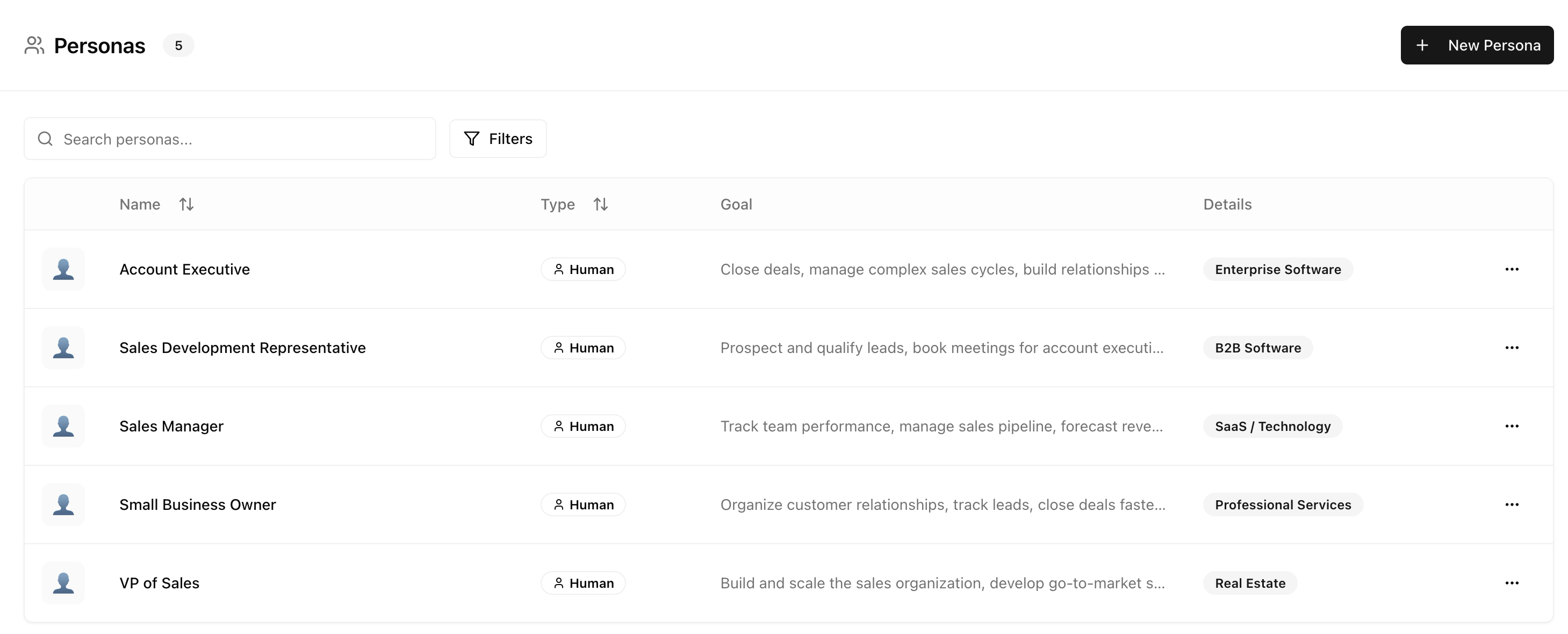
Different users ask questions differently — and AI responds differently based on context. Personas in Attensira let you simulate how different user types experience AI search.
 ## Why personas matter
A startup founder asking "What CRM should I use?" may get different recommendations than an enterprise IT manager asking the same question. AI models pick up on context clues and adjust their responses.
**Query:** "What CRM should I use?"
**Likely response focus:**
* Ease of setup
* Affordable pricing
* Essential features
* Scalability for growth
**Query:** "What CRM should I use?"
**Likely response focus:**
* Security and compliance
* Integration capabilities
* Vendor support
* Customization options
By using personas, you see how your visibility changes across different audience segments.
## Creating a persona
Navigate to **Settings → Personas** and click **Add Persona** to create a new persona from scratch, or choose from a template.
## Why personas matter
A startup founder asking "What CRM should I use?" may get different recommendations than an enterprise IT manager asking the same question. AI models pick up on context clues and adjust their responses.
**Query:** "What CRM should I use?"
**Likely response focus:**
* Ease of setup
* Affordable pricing
* Essential features
* Scalability for growth
**Query:** "What CRM should I use?"
**Likely response focus:**
* Security and compliance
* Integration capabilities
* Vendor support
* Customization options
By using personas, you see how your visibility changes across different audience segments.
## Creating a persona
Navigate to **Settings → Personas** and click **Add Persona** to create a new persona from scratch, or choose from a template.
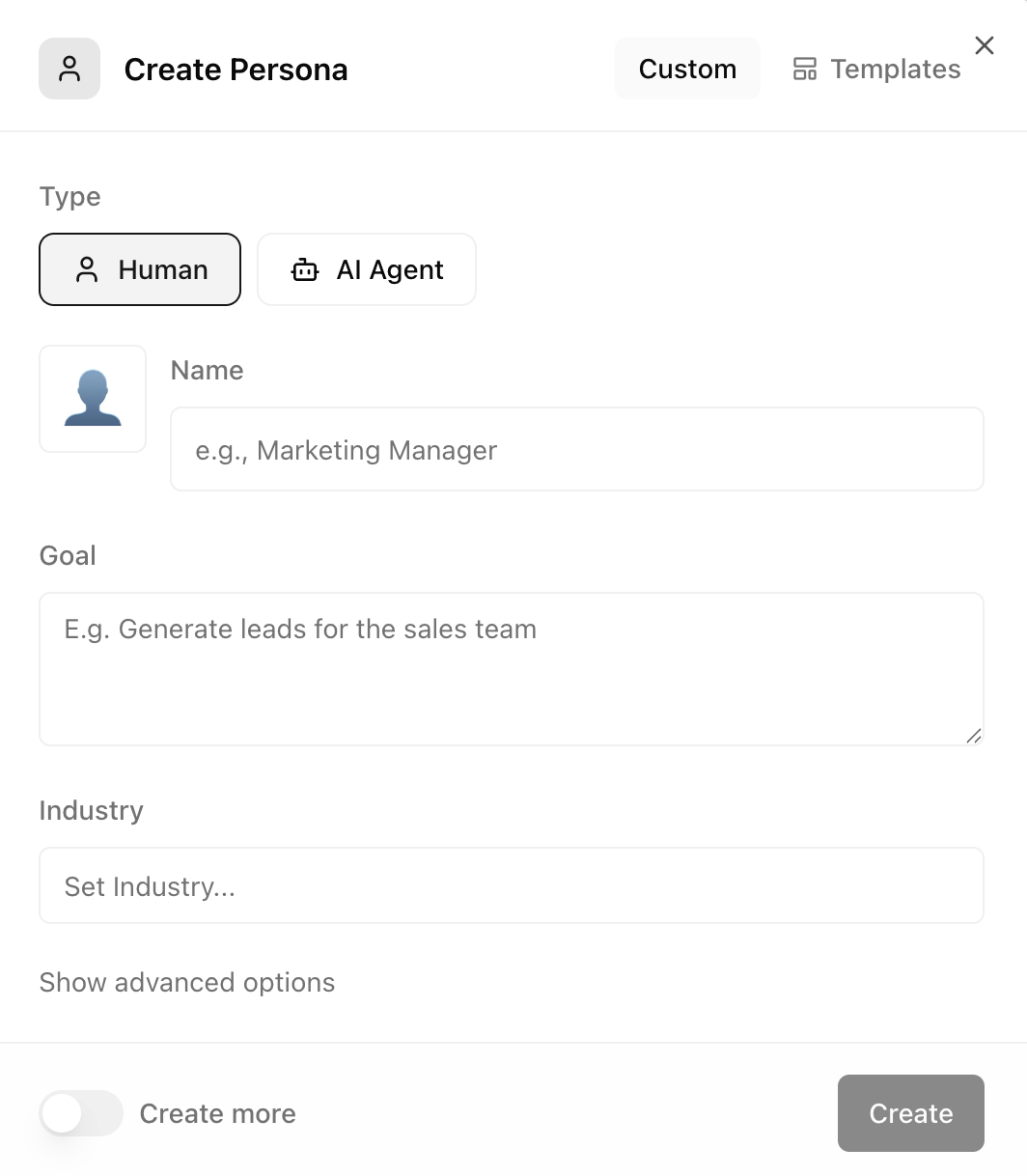 Once created, you can attach personas to prompts and pages to see how your visibility varies across different audience segments.
## Configuration options
| Field | Description | Example |
| ------------ | -------------------------------------- | ----------------------------------- |
| **Name** | Short identifier for the persona | "Marketing Manager" |
| **Goal** | What this persona is trying to achieve | "Generate leads for the sales team" |
| **Industry** | The persona's industry context | "B2B SaaS" |
### Advanced options
| Field | Description |
| ---------------- | ------------------------------------------- |
| **Gender** | Gender of the persona |
| **Age Range** | Age bracket |
| **Location** | Geographic location (e.g., "New York, USA") |
| **Company Size** | Organization scale |
| **Experience** | Experience level |
| **Budget Range** | Budget constraints |
## Persona templates
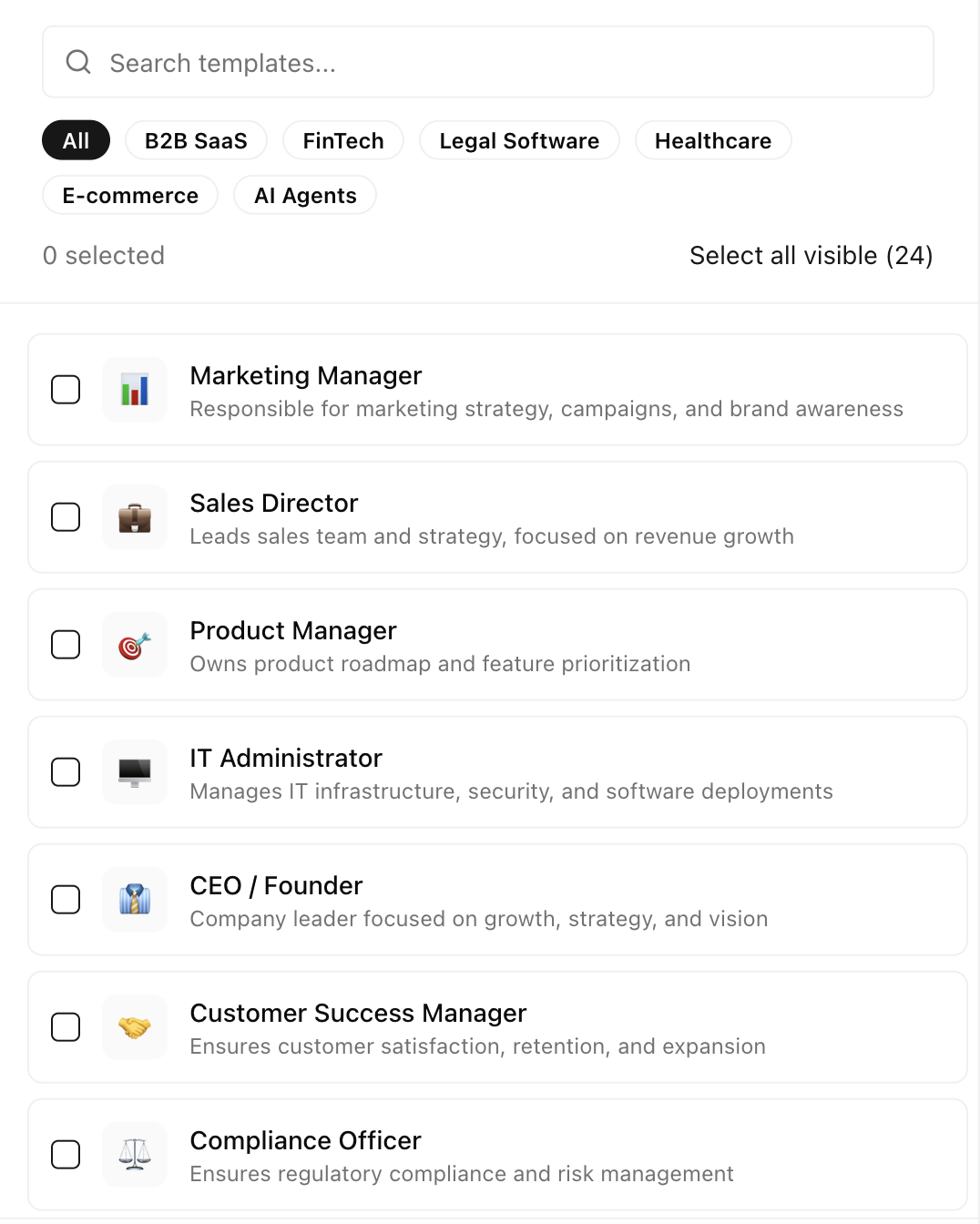
Don't want to start from scratch? Attensira includes a library of pre-built persona templates based on common audience segments.
Once created, you can attach personas to prompts and pages to see how your visibility varies across different audience segments.
## Configuration options
| Field | Description | Example |
| ------------ | -------------------------------------- | ----------------------------------- |
| **Name** | Short identifier for the persona | "Marketing Manager" |
| **Goal** | What this persona is trying to achieve | "Generate leads for the sales team" |
| **Industry** | The persona's industry context | "B2B SaaS" |
### Advanced options
| Field | Description |
| ---------------- | ------------------------------------------- |
| **Gender** | Gender of the persona |
| **Age Range** | Age bracket |
| **Location** | Geographic location (e.g., "New York, USA") |
| **Company Size** | Organization scale |
| **Experience** | Experience level |
| **Budget Range** | Budget constraints |
## Persona templates
Don't want to start from scratch? Attensira includes a library of pre-built persona templates based on common audience segments.
 ### For B2B SaaS
| Persona | Focus |
| ----------------------- | --------------------------- |
| **Startup Founder** | Speed, price, simplicity |
| **SMB Decision Maker** | Value, support, ease of use |
| **Enterprise Buyer** | Security, compliance, scale |
| **Technical Evaluator** | Integrations, API, features |
### For E-commerce / DTC
| Persona | Focus |
| -------------------- | ------------------------------ |
| **Budget Conscious** | Price, deals, value |
| **Quality Seeker** | Reviews, durability, brand |
| **Research-Heavy** | Comparisons, specs, details |
| **Impulse Buyer** | Quick answers, recommendations |
### For Services / Agencies
| Persona | Focus |
| --------------------- | ----------------------------------- |
| **First-Time Buyer** | Education, trust, process |
| **Experienced Buyer** | Efficiency, expertise, results |
| **Price Shopper** | Cost comparisons, value |
| **Quality Focused** | Portfolio, reputation, case studies |
## Best practices
Don't overcomplicate. Start with your primary and secondary audiences, then expand.
Base personas on actual customer segments. Use data from sales and marketing.
As your target market evolves, update your personas to match.
Not every prompt needs every persona. Focus personas on high-value queries.
## Next steps
Organize your prompts and personas with tags
See how your prompts perform across personas
### For B2B SaaS
| Persona | Focus |
| ----------------------- | --------------------------- |
| **Startup Founder** | Speed, price, simplicity |
| **SMB Decision Maker** | Value, support, ease of use |
| **Enterprise Buyer** | Security, compliance, scale |
| **Technical Evaluator** | Integrations, API, features |
### For E-commerce / DTC
| Persona | Focus |
| -------------------- | ------------------------------ |
| **Budget Conscious** | Price, deals, value |
| **Quality Seeker** | Reviews, durability, brand |
| **Research-Heavy** | Comparisons, specs, details |
| **Impulse Buyer** | Quick answers, recommendations |
### For Services / Agencies
| Persona | Focus |
| --------------------- | ----------------------------------- |
| **First-Time Buyer** | Education, trust, process |
| **Experienced Buyer** | Efficiency, expertise, results |
| **Price Shopper** | Cost comparisons, value |
| **Quality Focused** | Portfolio, reputation, case studies |
## Best practices
Don't overcomplicate. Start with your primary and secondary audiences, then expand.
Base personas on actual customer segments. Use data from sales and marketing.
As your target market evolves, update your personas to match.
Not every prompt needs every persona. Focus personas on high-value queries.
## Next steps
Organize your prompts and personas with tags
See how your prompts perform across personas