> ## Documentation Index
> Fetch the complete documentation index at: https://docs.attensira.com/llms.txt
> Use this file to discover all available pages before exploring further.
# Sources
> See every domain that AI models reference when answering your tracked prompts. Understand which websites have authority in your space and where to focus optimization efforts.
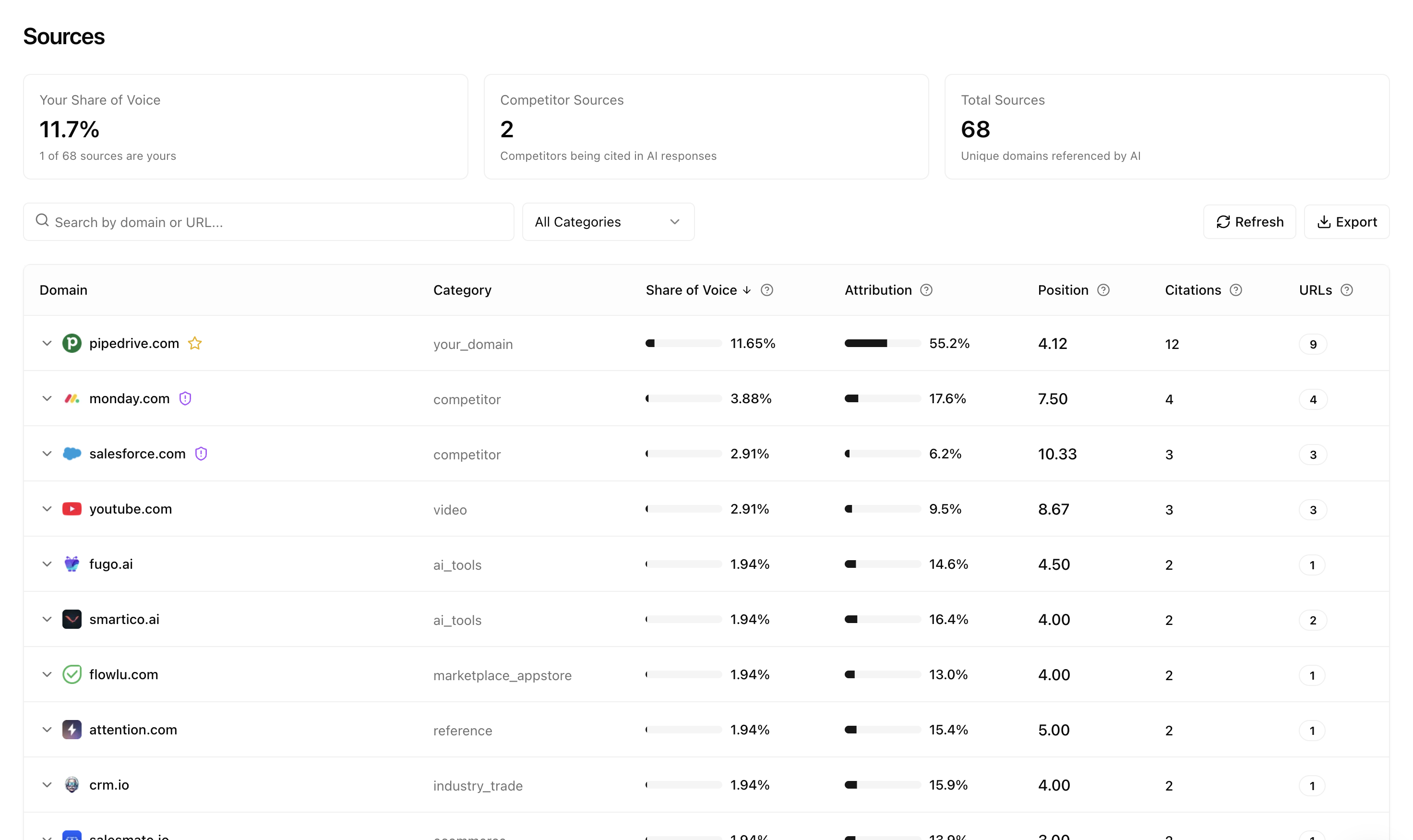
The Sources page shows you every domain that AI models reference when responding to your tracked prompts. This helps you understand which websites have authority in your space and where to focus your optimization efforts.
 ## Overview metrics
At the top of the page, you'll see three summary cards:
* **Your Share of Voice** — The percentage of source citations that come from your domain
* **Competitor Sources** — How many of your competitors are being cited in AI responses
* **Total Sources** — The total number of unique domains referenced by AI across all your prompts
## Understanding the columns
Each row in the sources table represents a domain. Here's what each column tells you:
| Column | Description |
| ------------------ | -------------------------------------------------------------------------------------------- |
| **Domain** | The website being cited. Your domain is marked with a star, competitors show their icon |
| **Category** | The type of source (your\_domain, competitor, video, ai\_tools, reference, etc.) |
| **Share of Voice** | What percentage of all source citations this domain receives |
| **Attribution** | How often this domain is explicitly named or linked vs. just having its content used |
| **Position** | The average position when this domain appears in a list of recommendations (lower is better) |
| **Citations** | The total number of times this domain has been cited across all prompts |
| **URLs** | How many unique pages from this domain are being referenced |
## Viewing your cited pages
Click on any domain row to expand it and see exactly which URLs are being cited:
## Overview metrics
At the top of the page, you'll see three summary cards:
* **Your Share of Voice** — The percentage of source citations that come from your domain
* **Competitor Sources** — How many of your competitors are being cited in AI responses
* **Total Sources** — The total number of unique domains referenced by AI across all your prompts
## Understanding the columns
Each row in the sources table represents a domain. Here's what each column tells you:
| Column | Description |
| ------------------ | -------------------------------------------------------------------------------------------- |
| **Domain** | The website being cited. Your domain is marked with a star, competitors show their icon |
| **Category** | The type of source (your\_domain, competitor, video, ai\_tools, reference, etc.) |
| **Share of Voice** | What percentage of all source citations this domain receives |
| **Attribution** | How often this domain is explicitly named or linked vs. just having its content used |
| **Position** | The average position when this domain appears in a list of recommendations (lower is better) |
| **Citations** | The total number of times this domain has been cited across all prompts |
| **URLs** | How many unique pages from this domain are being referenced |
## Viewing your cited pages
Click on any domain row to expand it and see exactly which URLs are being cited:
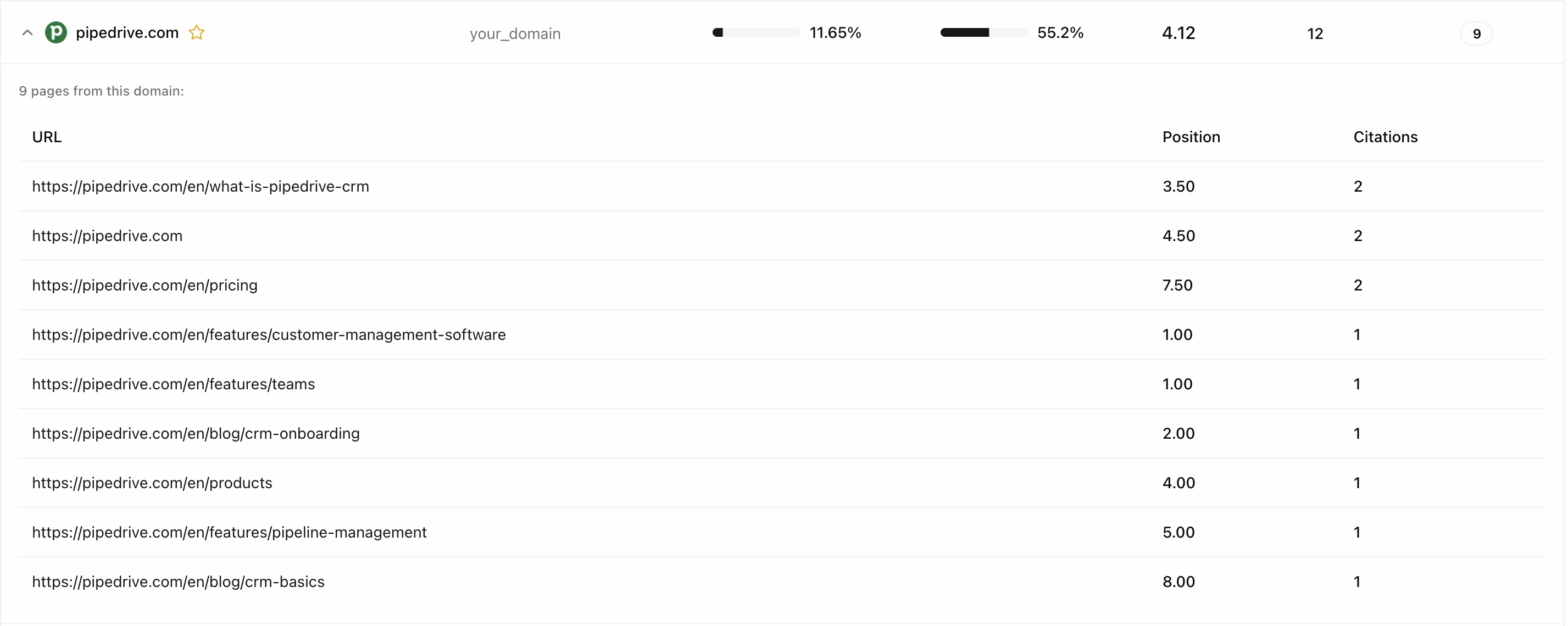 This expanded view shows you:
* Each specific URL being referenced
* The average position for that URL
* How many times that URL has been cited
Use this to understand which of your pages are performing well and which might need optimization.
## Tracking competitor sources
The same expanded view works for competitors, showing you which of their pages AI models prefer:
This expanded view shows you:
* Each specific URL being referenced
* The average position for that URL
* How many times that URL has been cited
Use this to understand which of your pages are performing well and which might need optimization.
## Tracking competitor sources
The same expanded view works for competitors, showing you which of their pages AI models prefer:
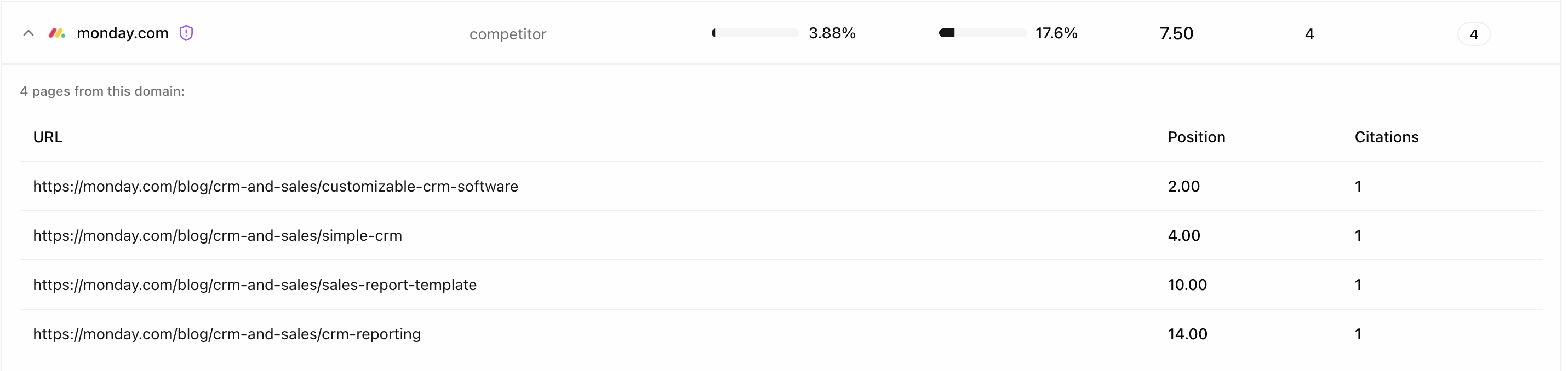 This competitive intelligence helps you:
* Identify content gaps where competitors are being cited but you're not
* Discover which competitor pages have authority in AI responses
* Find opportunities to create better content on the same topics
## Categories
Sources are automatically categorized to help you analyze different types of authority:
* **your\_domain** — Your own website
* **competitor** — Websites you've marked as competitors
* **video** — Video platforms like YouTube
* **ai\_tools** — AI and software tool websites
* **reference** — General reference and educational sites
* **industry\_trade** — Industry publications and trade sites
* **marketplace\_appstore** — App stores and marketplaces
Use the category filter to focus on specific source types.
## Key insights
As you analyze your sources data, you'll notice that different prompts use different sources. However, patterns quickly emerge showing which domains are most important in your industry.
Sources are updated daily as we refresh prompt responses. Check back regularly to see how source authority shifts over time.
## Using sources data effectively
1. **Identify gaps** — If competitors appear frequently but you don't, prioritize creating content for those topics
2. **Double down on strengths** — Pages already being cited can often be expanded to capture more citations
3. **Monitor third-party sites** — Review sites, industry publications, and community forums often carry significant weight
4. **Track trends** — Watch for new domains gaining authority or established ones losing influence
## Next steps
Understand query popularity
Track brand and competitor mentions
This competitive intelligence helps you:
* Identify content gaps where competitors are being cited but you're not
* Discover which competitor pages have authority in AI responses
* Find opportunities to create better content on the same topics
## Categories
Sources are automatically categorized to help you analyze different types of authority:
* **your\_domain** — Your own website
* **competitor** — Websites you've marked as competitors
* **video** — Video platforms like YouTube
* **ai\_tools** — AI and software tool websites
* **reference** — General reference and educational sites
* **industry\_trade** — Industry publications and trade sites
* **marketplace\_appstore** — App stores and marketplaces
Use the category filter to focus on specific source types.
## Key insights
As you analyze your sources data, you'll notice that different prompts use different sources. However, patterns quickly emerge showing which domains are most important in your industry.
Sources are updated daily as we refresh prompt responses. Check back regularly to see how source authority shifts over time.
## Using sources data effectively
1. **Identify gaps** — If competitors appear frequently but you don't, prioritize creating content for those topics
2. **Double down on strengths** — Pages already being cited can often be expanded to capture more citations
3. **Monitor third-party sites** — Review sites, industry publications, and community forums often carry significant weight
4. **Track trends** — Watch for new domains gaining authority or established ones losing influence
## Next steps
Understand query popularity
Track brand and competitor mentions