> ## Documentation Index
> Fetch the complete documentation index at: https://docs.attensira.com/llms.txt
> Use this file to discover all available pages before exploring further.
# Mentions
> See everywhere your brand appears in AI responses across the Attensira network — not just your tracked prompts. Discover visibility you didn't know you had and find new opportunities.
You're monitoring specific prompts, but your brand appears in AI responses across thousands of other queries. Mentions shows you everywhere your brand was cited across the Attensira network—helping you discover visibility you didn't know you had.
 ## How it works
You might be actively tracking 50 prompts. But your brand could be appearing in 500 others you never thought to monitor.
Mentions surfaces all of these automatically. Instead of guessing which prompts to track, you can see the full picture of where your brand shows up—then decide which ones are worth monitoring more closely.
## What you'll see
Navigate to **Research → Mentions** to explore:
* All brand appearances across the Attensira network
* Mention trends over time
* Competitor mentions for comparison
* Context and sentiment for each mention
### Understanding the details
## How it works
You might be actively tracking 50 prompts. But your brand could be appearing in 500 others you never thought to monitor.
Mentions surfaces all of these automatically. Instead of guessing which prompts to track, you can see the full picture of where your brand shows up—then decide which ones are worth monitoring more closely.
## What you'll see
Navigate to **Research → Mentions** to explore:
* All brand appearances across the Attensira network
* Mention trends over time
* Competitor mentions for comparison
* Context and sentiment for each mention
### Understanding the details
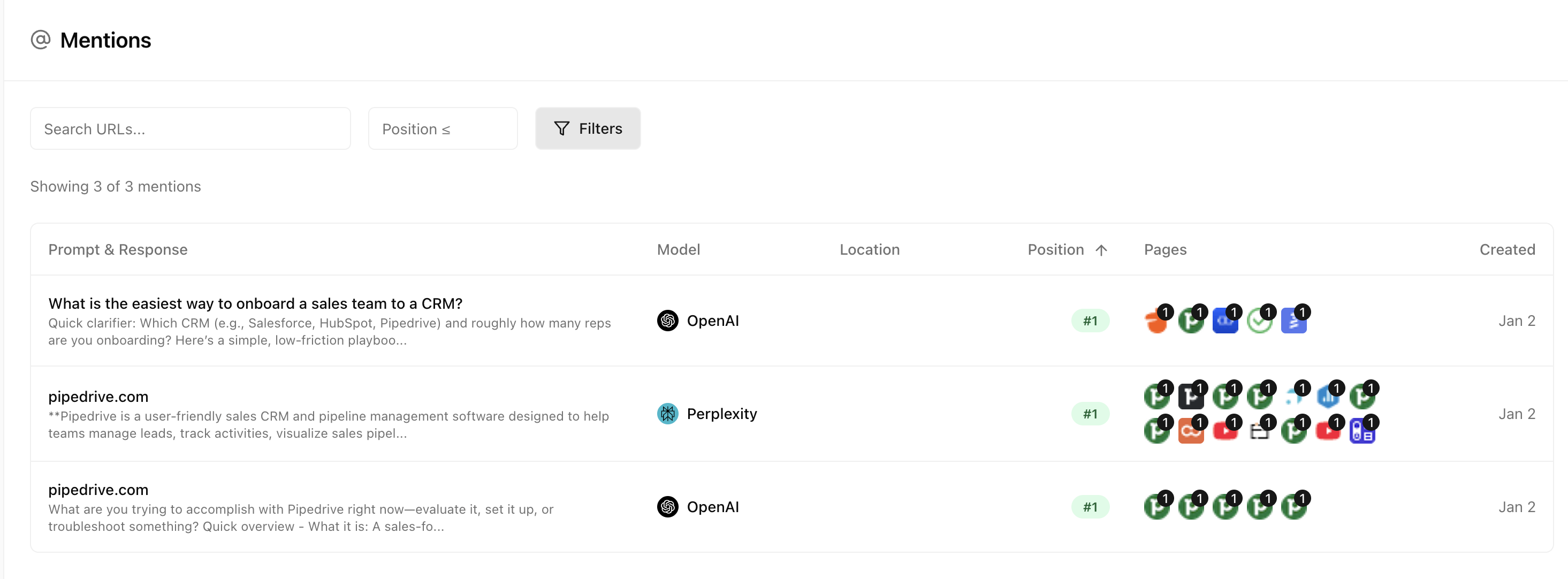
 Each row shows a specific mention with:
| Column | What it shows |
| ------------ | ----------------------------------------------------------------------------------------------------- |
| **Prompt** | The query that triggered the mention |
| **Response** | The AI's answer where your brand appeared |
| **Model** | Which AI platform returned this response |
| **Position** | Where you first appeared in the response (e.g., Position 2 means you were the second brand mentioned) |
| **URLs** | All sources cited in the response |
Hover over any row to see more context—like the example above showing a mention for "What is the easiest way to onboard a sales team?" where the brand appeared at Position 2, alongside other cited sources like insightly.com.
## From mentions to monitoring
Spot a prompt where you're appearing that you hadn't considered? You can add it to your tracked prompts directly from the Mentions view to start monitoring it more closely.
## Next steps
Understand query popularity
See which sources AI models cite
Each row shows a specific mention with:
| Column | What it shows |
| ------------ | ----------------------------------------------------------------------------------------------------- |
| **Prompt** | The query that triggered the mention |
| **Response** | The AI's answer where your brand appeared |
| **Model** | Which AI platform returned this response |
| **Position** | Where you first appeared in the response (e.g., Position 2 means you were the second brand mentioned) |
| **URLs** | All sources cited in the response |
Hover over any row to see more context—like the example above showing a mention for "What is the easiest way to onboard a sales team?" where the brand appeared at Position 2, alongside other cited sources like insightly.com.
## From mentions to monitoring
Spot a prompt where you're appearing that you hadn't considered? You can add it to your tracked prompts directly from the Mentions view to start monitoring it more closely.
## Next steps
Understand query popularity
See which sources AI models cite