> ## Documentation Index
> Fetch the complete documentation index at: https://docs.attensira.com/llms.txt
> Use this file to discover all available pages before exploring further.
# Winning
> Learn how to appear in AI answers and win share of voice from competitors. Analyze sources, create winning content in Studio, and build links from high-attribution sources.
Winning a prompt means being part of the AI answer, ideally with the highest share of voice. This guide walks you through exactly how to use Attensira to improve your visibility.
## The fundamental difference from SEO
Before diving in, understand what makes AI search different from traditional SEO.
With Google, ranking in the top 10 means you get traffic. With AI search, being in the top 20 results is just the **first step**. You need to be indexed, but being indexed does not guarantee you will be in the answer.
The goal is not just to rank. The goal is to be **in the answer**.
If Google has not indexed your page, AI models will almost certainly not find it. Getting indexed is the prerequisite. But indexed does not mean answered.
## Start here: Do you show up?
Open your [prompt results](/optimization/prompt/results) and check the header metrics:
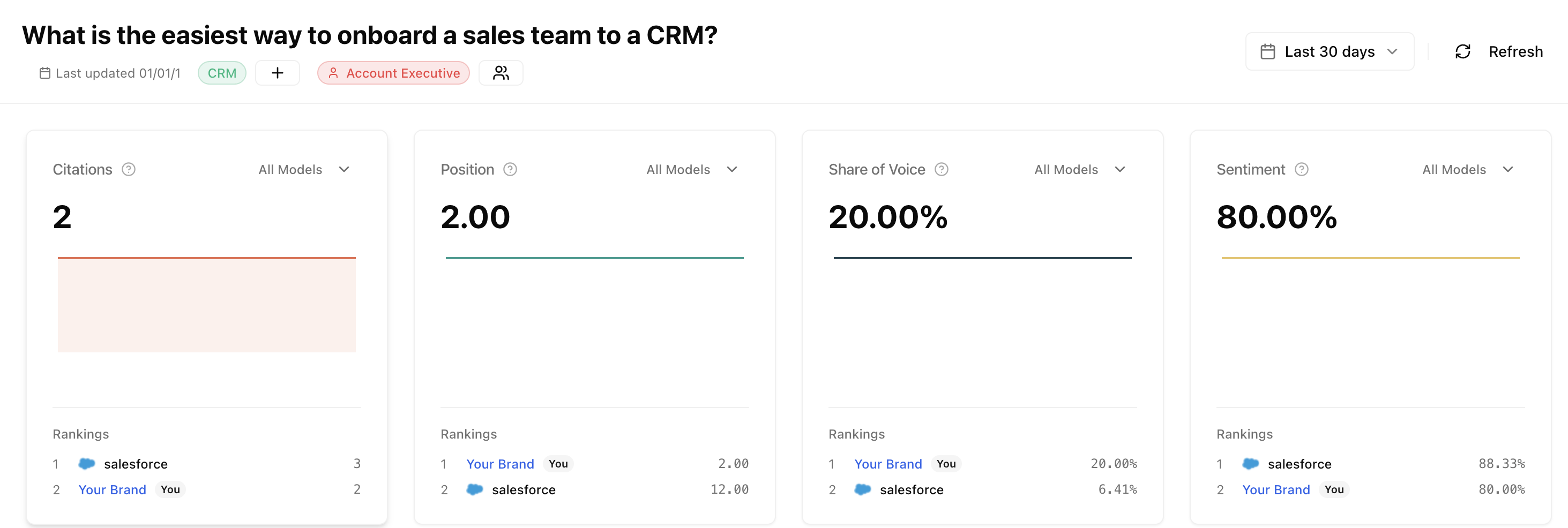 If your **Citations** and **Share of Voice** are both zero, you are not showing up for this prompt. No citations means AI is not using any of your pages as sources.
You are not appearing in AI responses for this prompt
You appear but competitors have higher share of voice
***
## If you don't show up
When you are not appearing in AI responses, start by checking the Improvements section.
If your **Citations** and **Share of Voice** are both zero, you are not showing up for this prompt. No citations means AI is not using any of your pages as sources.
You are not appearing in AI responses for this prompt
You appear but competitors have higher share of voice
***
## If you don't show up
When you are not appearing in AI responses, start by checking the Improvements section.
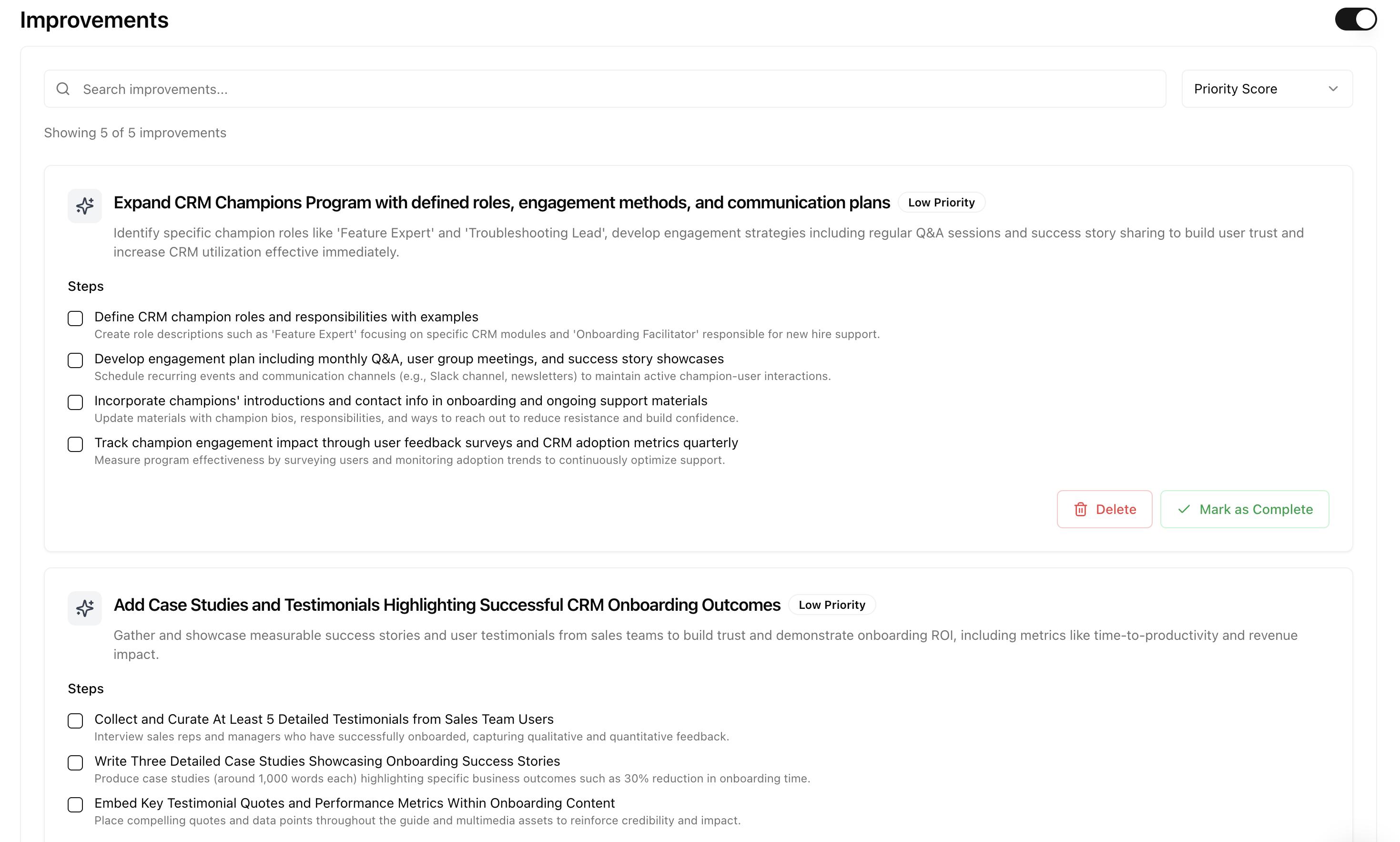 Attensira shows you which of your pages are most relevant to this prompt, ranked by similarity score. You have two options:
### Option 1: Modify an existing page
If you have a page with high similarity score, optimize it.
Attensira shows you which of your pages are most relevant to this prompt, ranked by similarity score. You have two options:
### Option 1: Modify an existing page
If you have a page with high similarity score, optimize it.
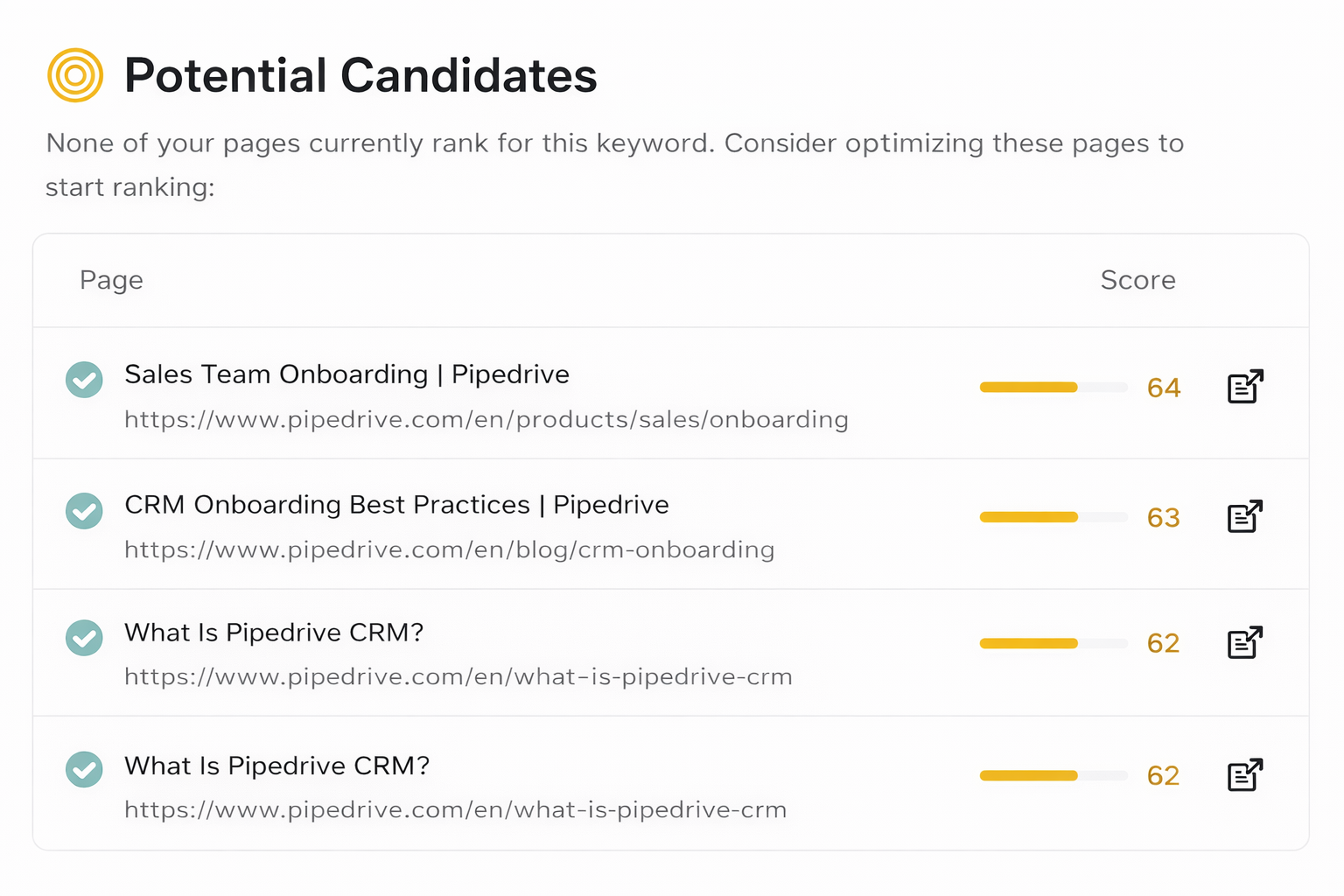 **Example: Pipedrive**
If Pipedrive wants to rank for "best CRM for startups" and their /solutions/startups page shows 74% similarity:
1. Click through to see the [Sources](/optimization/prompt/results#sources) AI is citing
2. Read what those sources cover
3. Update your page to match or exceed that depth
4. Enable improvements to get specific recommendations
Turn on improvements for this prompt. We analyze all the sources AI cited, understand what made them valuable, and give you specific recommendations.
### Option 2: Create new content
If you don't have relevant content (low similarity scores), create it in Studio.
Go to the content planner
Add it to your calendar and set a target date
Studio analyzes the prompt and sources, then generates optimized content
**Example: Pipedrive**
If Pipedrive wants to rank for "best CRM for startups" and their /solutions/startups page shows 74% similarity:
1. Click through to see the [Sources](/optimization/prompt/results#sources) AI is citing
2. Read what those sources cover
3. Update your page to match or exceed that depth
4. Enable improvements to get specific recommendations
Turn on improvements for this prompt. We analyze all the sources AI cited, understand what made them valuable, and give you specific recommendations.
### Option 2: Create new content
If you don't have relevant content (low similarity scores), create it in Studio.
Go to the content planner
Add it to your calendar and set a target date
Studio analyzes the prompt and sources, then generates optimized content
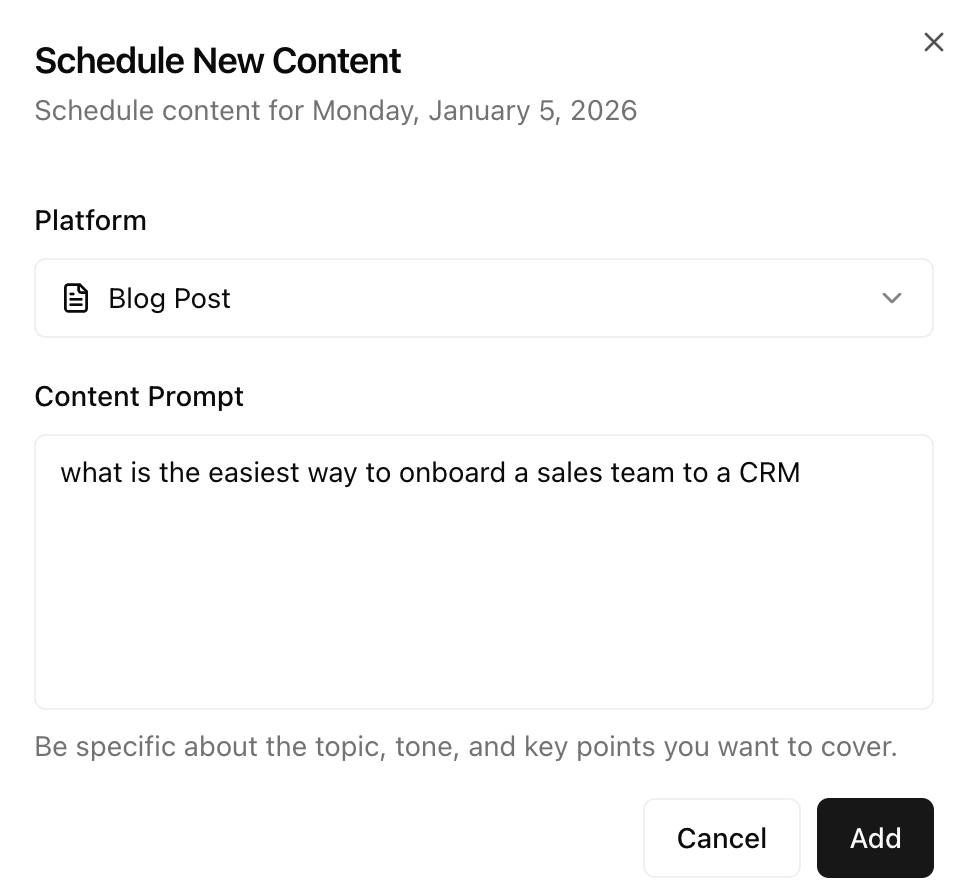 Make final edits in the editor
Export to your CMS and publish
Schedule and generate AI-optimized content
When creating, make sure to:
* Answer the prompt question directly and thoroughly
* Go deep on the topic, not broad
* Reference the sources AI is already citing for inspiration
* Bottom of funnel content helps top of funnel prompts too
***
## If you already show up
When you appear but want higher share of voice, your goal is to win market share from competitors.
### Step 1: Analyze the sources
Open the Sources section in your prompt results and **sort by Attribution**:
Make final edits in the editor
Export to your CMS and publish
Schedule and generate AI-optimized content
When creating, make sure to:
* Answer the prompt question directly and thoroughly
* Go deep on the topic, not broad
* Reference the sources AI is already citing for inspiration
* Bottom of funnel content helps top of funnel prompts too
***
## If you already show up
When you appear but want higher share of voice, your goal is to win market share from competitors.
### Step 1: Analyze the sources
Open the Sources section in your prompt results and **sort by Attribution**:
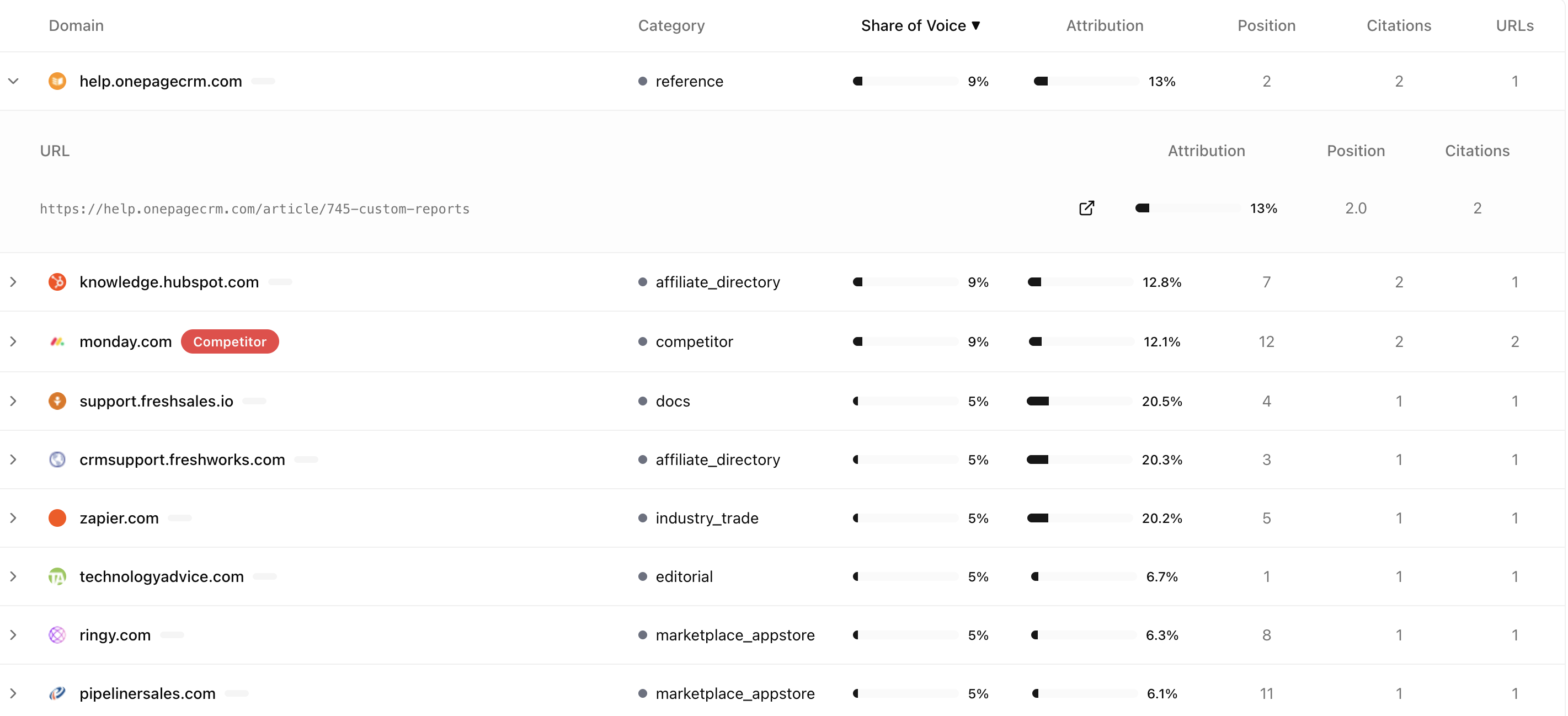 Attribution tells you how much of the answer's meaning came from each source. This is more important than Share of Voice.
**Sort by Attribution, not Share of Voice.** A source with 5% Share of Voice but 20% Attribution is more important than a source with 9% Share of Voice but only 15% Attribution. The first source is contributing more meaning per citation.
| What you see | What it means |
| ---------------- | ----------------------------------------------------- |
| High attribution | This source is shaping the answer - read it carefully |
| Low attribution | Referenced but not influential |
| Your site low | Your content is being used but minimally |
### Step 2: Read the high-attribution sources
Click into the sources with highest attribution. These are the ones AI values most.
Attribution tells you how much of the answer's meaning came from each source. This is more important than Share of Voice.
**Sort by Attribution, not Share of Voice.** A source with 5% Share of Voice but 20% Attribution is more important than a source with 9% Share of Voice but only 15% Attribution. The first source is contributing more meaning per citation.
| What you see | What it means |
| ---------------- | ----------------------------------------------------- |
| High attribution | This source is shaping the answer - read it carefully |
| Low attribution | Referenced but not influential |
| Your site low | Your content is being used but minimally |
### Step 2: Read the high-attribution sources
Click into the sources with highest attribution. These are the ones AI values most.
 Read them carefully and ask yourself:
* What depth do they go into?
* What questions do they answer?
* What structure do they use?
* What are they covering that I am not?
The goal is to understand why AI trusts these sources and write content that matches or exceeds that quality.
### Step 3: Create winning content in Studio
The winning strategy: write better content than everyone else on this specific topic. Use Studio to create it.
Add the content piece to your planner and schedule it
Studio creates AI-optimized content based on the prompt and sources
Review and refine the generated content
Read them carefully and ask yourself:
* What depth do they go into?
* What questions do they answer?
* What structure do they use?
* What are they covering that I am not?
The goal is to understand why AI trusts these sources and write content that matches or exceeds that quality.
### Step 3: Create winning content in Studio
The winning strategy: write better content than everyone else on this specific topic. Use Studio to create it.
Add the content piece to your planner and schedule it
Studio creates AI-optimized content based on the prompt and sources
Review and refine the generated content
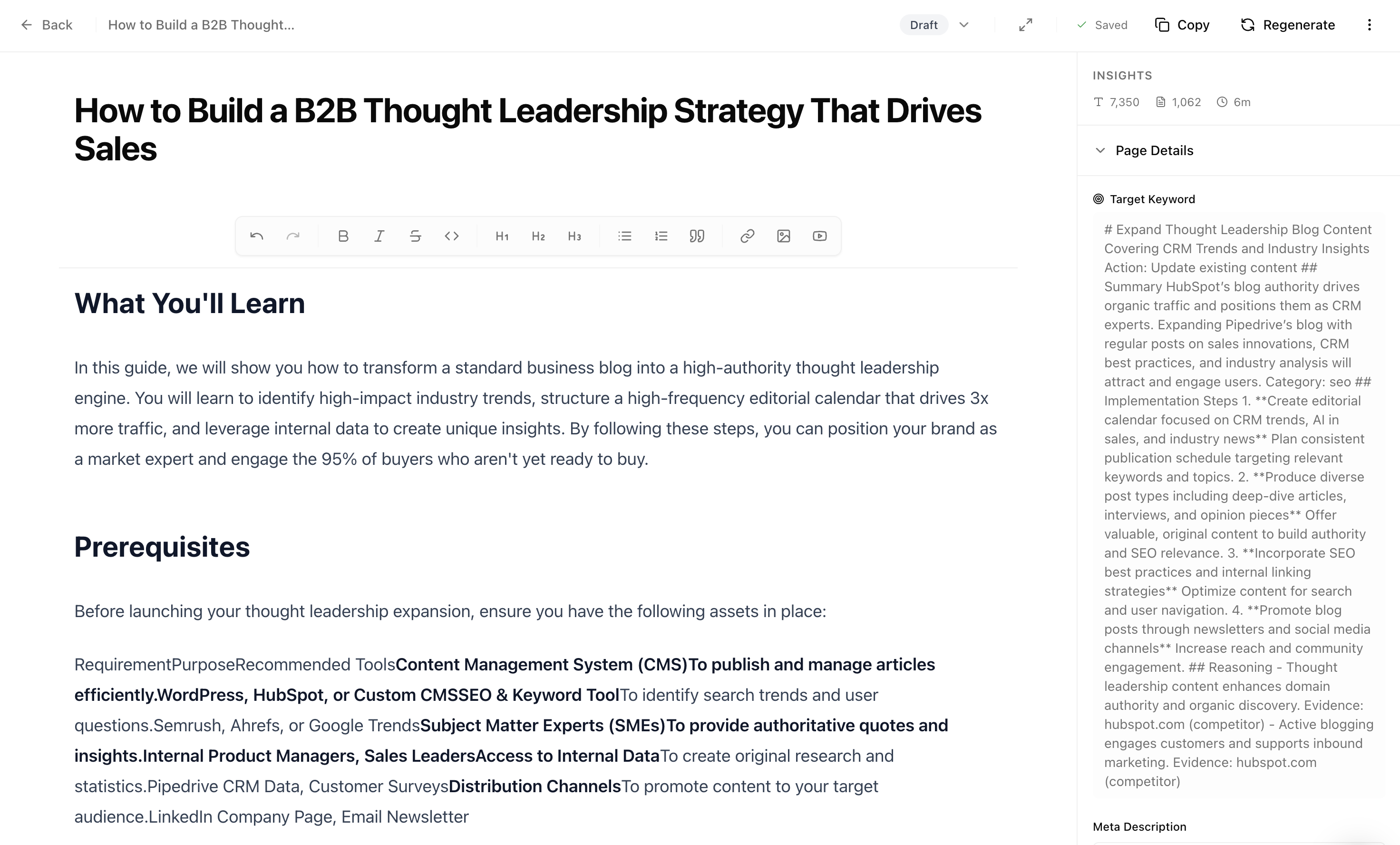 Export the final content to your website
When editing, make sure to:
* Cover everything competitors cover, plus more
* Add original data, examples, or insights
* Be more specific and actionable
* Structure content so AI can easily extract key points
Schedule and generate winning content
### Step 4: Get linked from high-attribution sources
The sources with highest attribution are where AI trusts most. Look at them in your prompt results:
Export the final content to your website
When editing, make sure to:
* Cover everything competitors cover, plus more
* Add original data, examples, or insights
* Be more specific and actionable
* Structure content so AI can easily extract key points
Schedule and generate winning content
### Step 4: Get linked from high-attribution sources
The sources with highest attribution are where AI trusts most. Look at them in your prompt results:
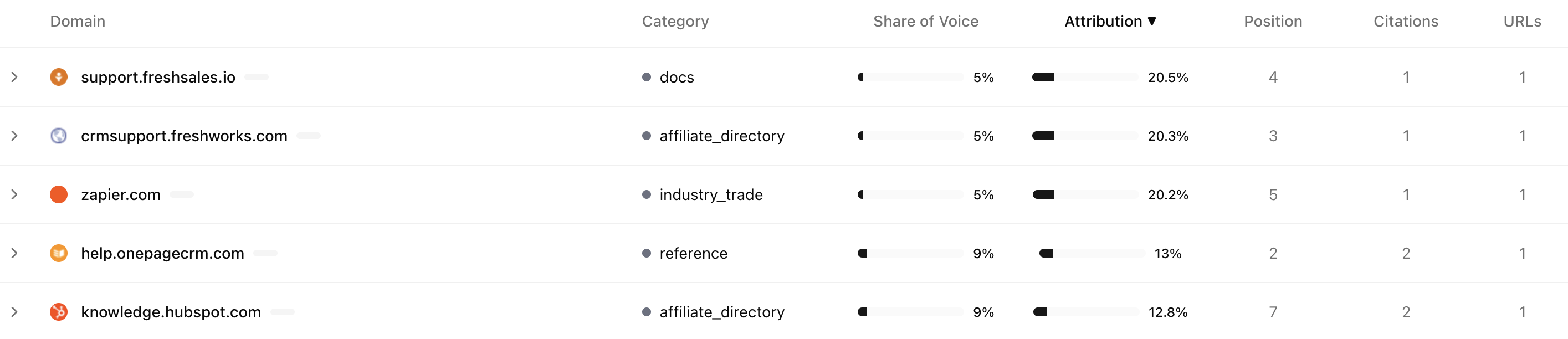 Focus your outreach on:
| Source type | How to get linked |
| ------------------------------- | ------------------------------------------- |
| **Review sites** (G2, Capterra) | Claim profile, collect reviews |
| **Industry publications** | Pitch stories, offer expert quotes |
| **Comparison articles** | Reach out to authors, provide accurate info |
| **Wikipedia** | Add citations if genuinely relevant |
***
## The winning checklist
### Step 1: Create content in Studio
Start by creating content in Studio. This is where you plan and generate AI-optimized content.
Create and schedule AI-optimized content
### Step 2: Review improvement ideas
Check the improvement ideas in your prompt results. These are automatically synced with Studio when they make sense.
Focus your outreach on:
| Source type | How to get linked |
| ------------------------------- | ------------------------------------------- |
| **Review sites** (G2, Capterra) | Claim profile, collect reviews |
| **Industry publications** | Pitch stories, offer expert quotes |
| **Comparison articles** | Reach out to authors, provide accurate info |
| **Wikipedia** | Add citations if genuinely relevant |
***
## The winning checklist
### Step 1: Create content in Studio
Start by creating content in Studio. This is where you plan and generate AI-optimized content.
Create and schedule AI-optimized content
### Step 2: Review improvement ideas
Check the improvement ideas in your prompt results. These are automatically synced with Studio when they make sense.
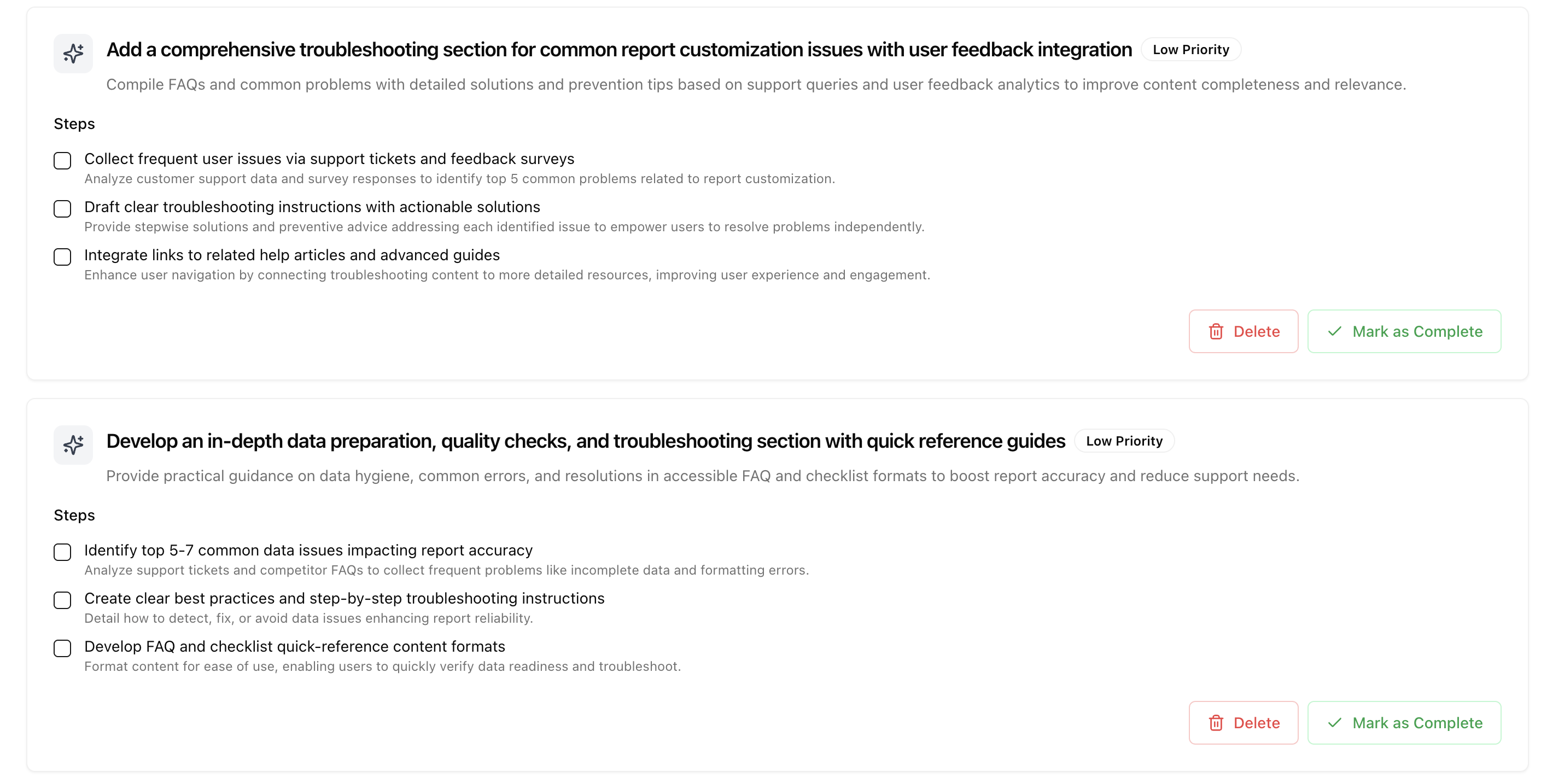 Take a look at these ideas - they can give you high-level direction for your content strategy. If any improvement ideas don't make sense for your situation, simply delete them.
### Step 3: Schedule content in Studio
If improvement ideas are not properly synced or you have other ideas, go to Studio and create scheduled content around them. We automatically plan it out so that your existing commitments are taken into account.
Take a look at these ideas - they can give you high-level direction for your content strategy. If any improvement ideas don't make sense for your situation, simply delete them.
### Step 3: Schedule content in Studio
If improvement ideas are not properly synced or you have other ideas, go to Studio and create scheduled content around them. We automatically plan it out so that your existing commitments are taken into account.
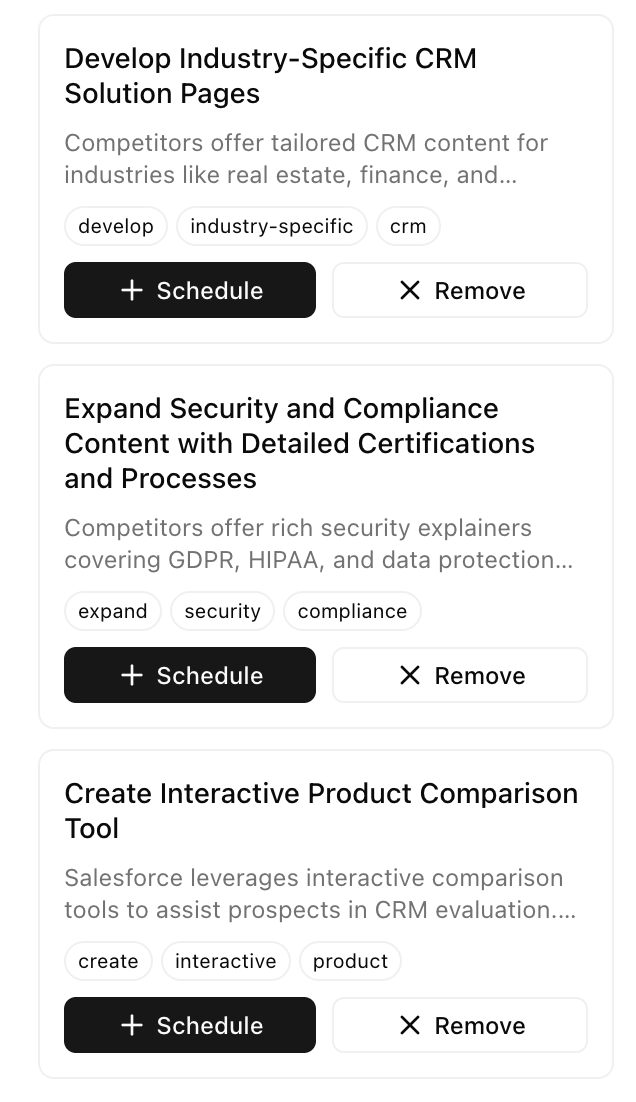 When you are in Studio, check the recommendations bar. You can schedule or decline any content recommendations directly from there.
View and manage content recommendations
## Key principles
AI search rewards content that thoroughly answers specific questions. One deep page beats ten shallow pages.
Detailed content about specific use cases helps you rank for broader queries too. AI connects the dots.
A single link from a high-attribution source is worth more than many links from sources AI ignores. Use the Sources view to prioritize.
AI models update their knowledge. Keep tracking your prompt results and improving based on what you learn.
## Next steps
### Go deeper, not broader
After optimizing for a prompt, the next step is to create more in-depth content around it. This is the fan-out strategy:
1. Take your current prompt
2. Identify more specific queries below it
3. Create content for those specific queries
4. Link them together
Optimizing for broader queries above your target will not help. Going deeper and more specific will. Bottom-up content builds authority that lifts your top-level prompts.
**Example:** If you are optimizing for "best CRM for sales teams":
* Go deeper: "best CRM for 10-person sales teams", "CRM for outbound sales teams", "CRM with sales automation"
* Do not go broader: "best business software" will not help
Use Studio to create this supporting content:
Create in-depth content around your target prompts
### Monitor your progress
Track your metrics to see improvement over time:
Monitor your AI visibility metrics
Check weekly to see:
* Are your citations increasing?
* Is your share of voice growing?
* Are you appearing in more prompts?
Review your current performance
Understand what each metric means
When you are in Studio, check the recommendations bar. You can schedule or decline any content recommendations directly from there.
View and manage content recommendations
## Key principles
AI search rewards content that thoroughly answers specific questions. One deep page beats ten shallow pages.
Detailed content about specific use cases helps you rank for broader queries too. AI connects the dots.
A single link from a high-attribution source is worth more than many links from sources AI ignores. Use the Sources view to prioritize.
AI models update their knowledge. Keep tracking your prompt results and improving based on what you learn.
## Next steps
### Go deeper, not broader
After optimizing for a prompt, the next step is to create more in-depth content around it. This is the fan-out strategy:
1. Take your current prompt
2. Identify more specific queries below it
3. Create content for those specific queries
4. Link them together
Optimizing for broader queries above your target will not help. Going deeper and more specific will. Bottom-up content builds authority that lifts your top-level prompts.
**Example:** If you are optimizing for "best CRM for sales teams":
* Go deeper: "best CRM for 10-person sales teams", "CRM for outbound sales teams", "CRM with sales automation"
* Do not go broader: "best business software" will not help
Use Studio to create this supporting content:
Create in-depth content around your target prompts
### Monitor your progress
Track your metrics to see improvement over time:
Monitor your AI visibility metrics
Check weekly to see:
* Are your citations increasing?
* Is your share of voice growing?
* Are you appearing in more prompts?
Review your current performance
Understand what each metric means