> ## Documentation Index
> Fetch the complete documentation index at: https://docs.attensira.com/llms.txt
> Use this file to discover all available pages before exploring further.
# Results
> Analyze page performance in AI search with Attensira. View technical, GEO, and content scores, track metrics over time, optimize titles and descriptions, and enable strategic improvements.
The page results view shows you everything about how a specific page performs across AI models. See your optimization scores, track metrics over time, analyze your content, and get strategic improvements.
## Header
At the top of the page results, you'll find key information and actions.
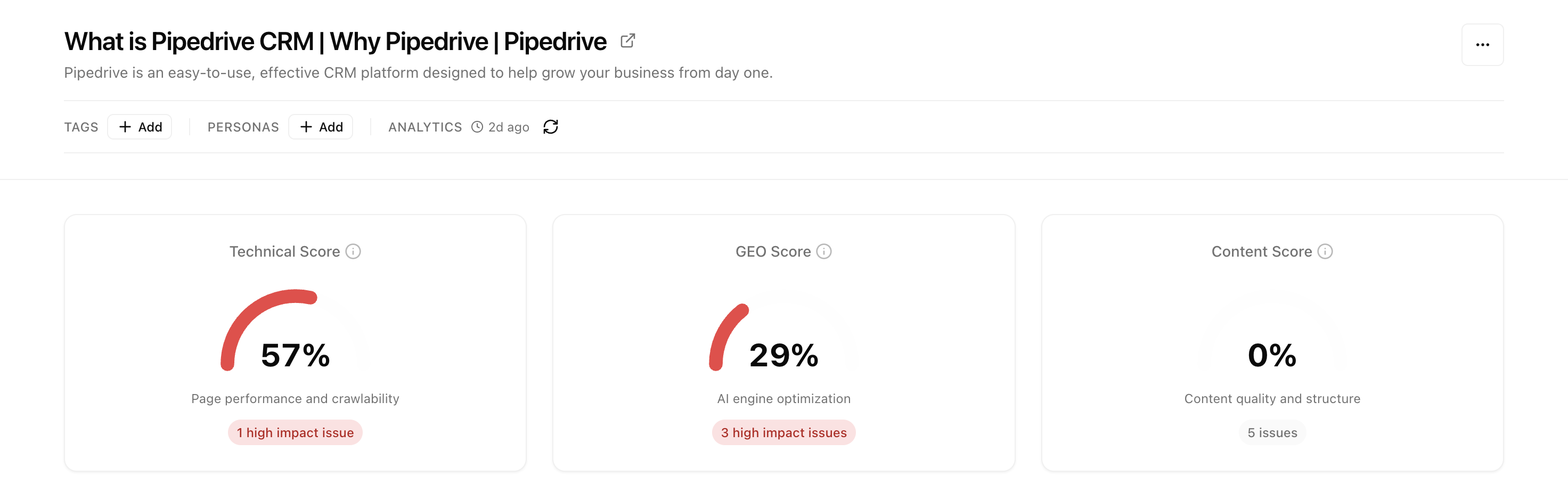 ### Page information
* **Title** - The page title as detected from your title tag
* **Description** - The meta description displayed under the title
* **Tags** - Click **+ Add** to organize pages with custom tags
* **Personas** - Click **+ Add** to assign personas for segmented analysis
* **Analytics** - Shows when data was last collected, with a refresh button to trigger new analysis
## Score Cards
Three score cards show your page's optimization health at a glance.
Page performance and crawlability. Measures how well AI can access and parse your content.
AI engine optimization. How well your page is structured for generative AI responses.
Content quality and structure. Evaluates depth, clarity, and organization.
Each score shows:
* **Percentage** - Your current score (0-100%)
* **Visual indicator** - Red/yellow/green arc showing health
* **Issue count** - Number of problems found, with severity (high impact issues highlighted in red)
### Understanding the scores
| Score | What it measures | Key factors |
| ------------- | --------------------------------- | --------------------------------------------------------------------- |
| **Technical** | Page performance and crawlability | Load speed, mobile-friendliness, crawl accessibility, structured data |
| **GEO** | AI engine optimization | Answer formatting, citation-worthy content, authority signals |
| **Content** | Content quality and structure | Depth, specificity, readability, logical organization |
Click on any score card to see detailed breakdowns and specific recommendations for improvement.
## Metrics
Track how your page performs in AI search engines over time. Use the date range selector to adjust the time period (default: Last 30 days).
### Page information
* **Title** - The page title as detected from your title tag
* **Description** - The meta description displayed under the title
* **Tags** - Click **+ Add** to organize pages with custom tags
* **Personas** - Click **+ Add** to assign personas for segmented analysis
* **Analytics** - Shows when data was last collected, with a refresh button to trigger new analysis
## Score Cards
Three score cards show your page's optimization health at a glance.
Page performance and crawlability. Measures how well AI can access and parse your content.
AI engine optimization. How well your page is structured for generative AI responses.
Content quality and structure. Evaluates depth, clarity, and organization.
Each score shows:
* **Percentage** - Your current score (0-100%)
* **Visual indicator** - Red/yellow/green arc showing health
* **Issue count** - Number of problems found, with severity (high impact issues highlighted in red)
### Understanding the scores
| Score | What it measures | Key factors |
| ------------- | --------------------------------- | --------------------------------------------------------------------- |
| **Technical** | Page performance and crawlability | Load speed, mobile-friendliness, crawl accessibility, structured data |
| **GEO** | AI engine optimization | Answer formatting, citation-worthy content, authority signals |
| **Content** | Content quality and structure | Depth, specificity, readability, logical organization |
Click on any score card to see detailed breakdowns and specific recommendations for improvement.
## Metrics
Track how your page performs in AI search engines over time. Use the date range selector to adjust the time period (default: Last 30 days).
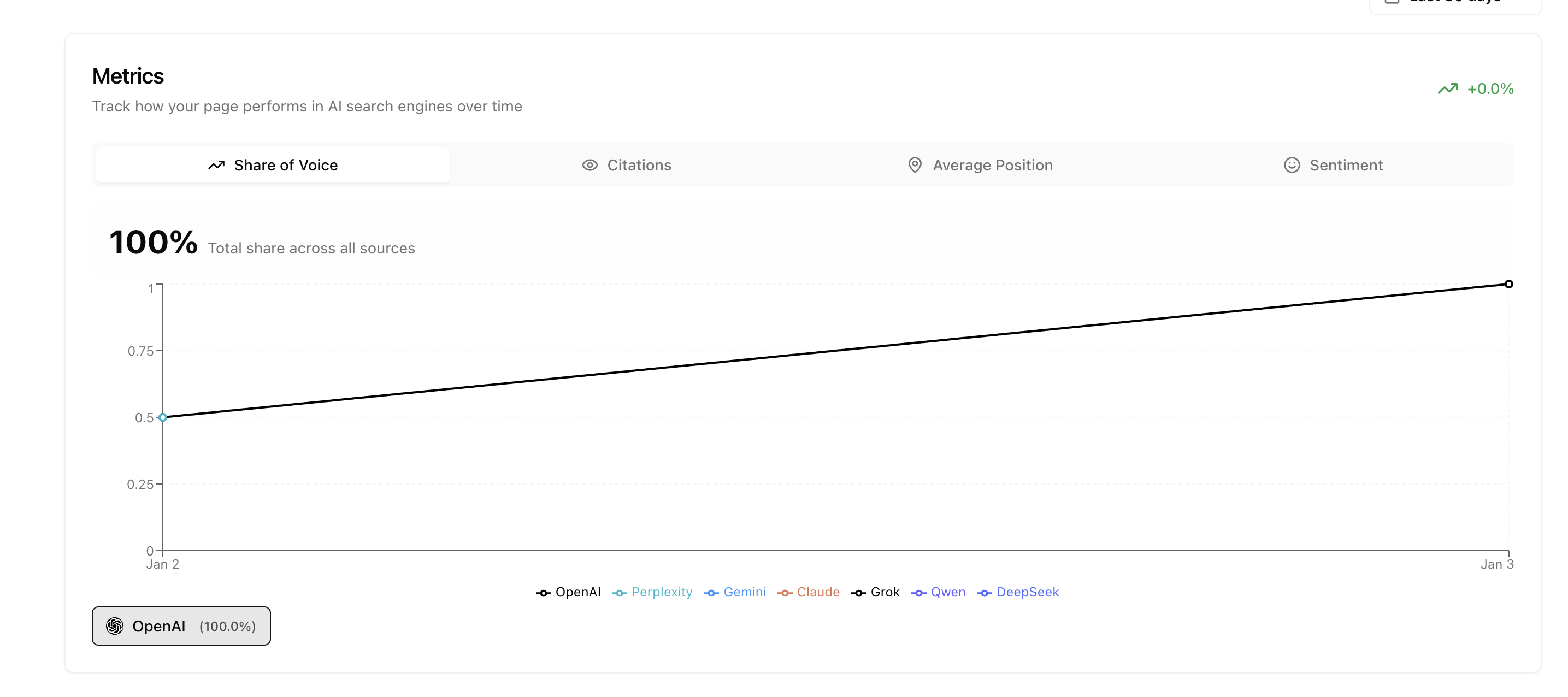 Four tabs let you track different aspects of your page performance, broken down by AI platform (OpenAI, Perplexity, Gemini, Claude, Copilot, Grok, Qwen, DeepSeek, Google AI Mode, Google AI Overview):
Your percentage of AI responses
How often you're cited as a source
Where you rank when mentioned
How AI describes your brand
## Content Tab
The Content tab is the most important section for optimization. It shows exactly how AI sees your page and guides you through improvements.
Four tabs let you track different aspects of your page performance, broken down by AI platform (OpenAI, Perplexity, Gemini, Claude, Copilot, Grok, Qwen, DeepSeek, Google AI Mode, Google AI Overview):
Your percentage of AI responses
How often you're cited as a source
Where you rank when mentioned
How AI describes your brand
## Content Tab
The Content tab is the most important section for optimization. It shows exactly how AI sees your page and guides you through improvements.
 ### Title
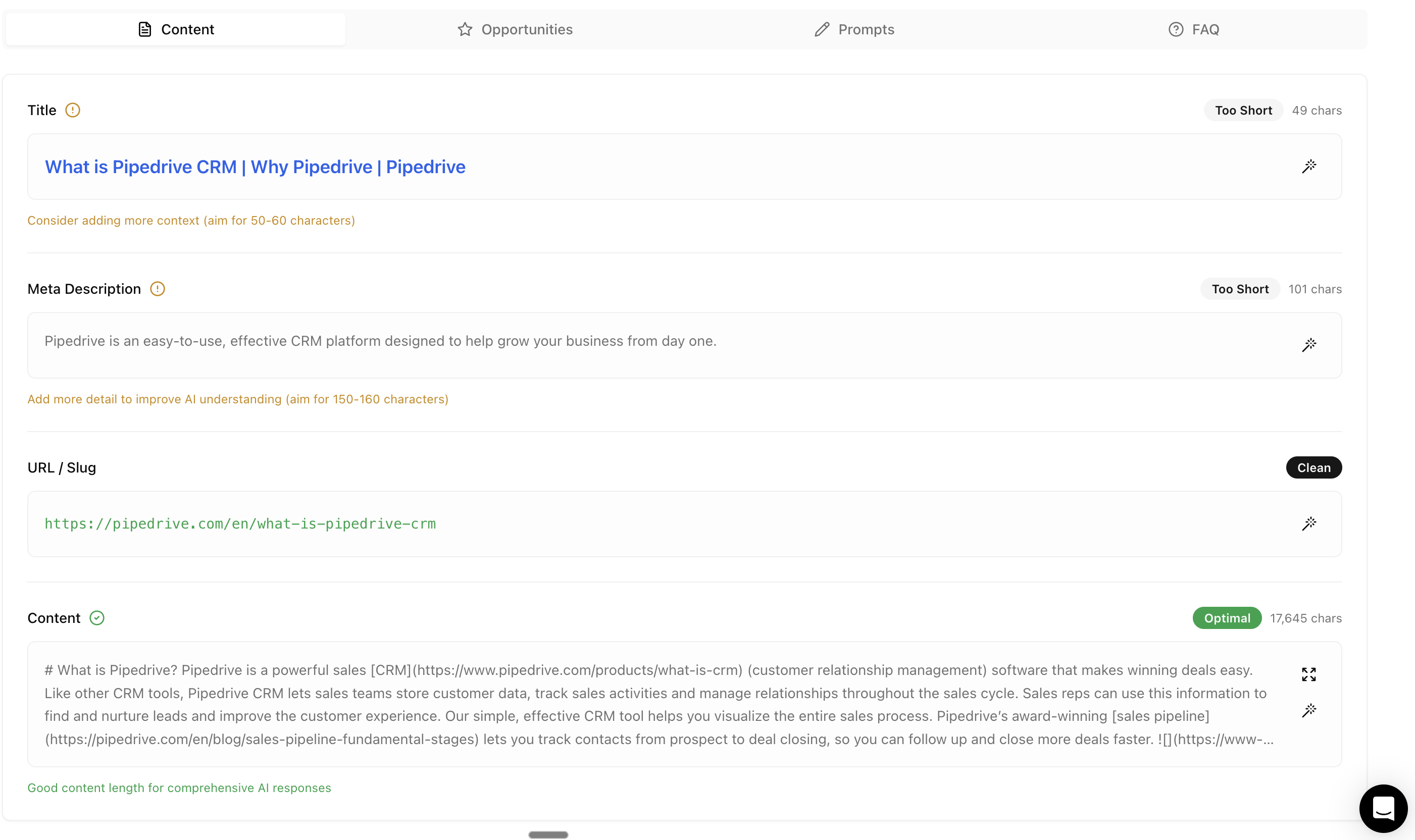
Your page title with real-time optimization feedback. A status indicator shows whether your title is **Too Short**, **Optimal**, or **Too Long**, with character count displayed.
### Title
Your page title with real-time optimization feedback. A status indicator shows whether your title is **Too Short**, **Optimal**, or **Too Long**, with character count displayed.
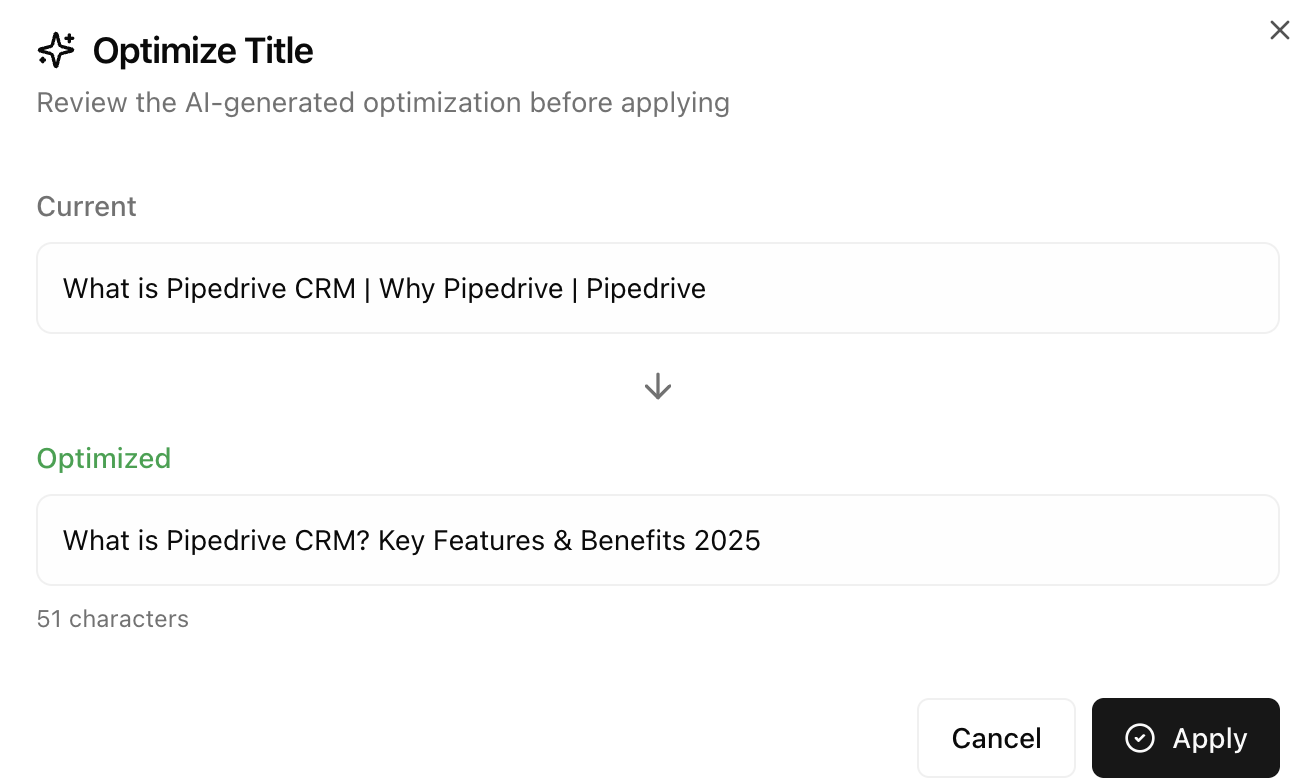 Click the wand icon to generate an AI-optimized title. Attensira suggests improvements that make your title more compelling for AI citations while maintaining your brand voice.
### Meta Description
Your meta description with AI-specific guidance. The status indicator helps you hit the sweet spot for AI comprehension (aim for 150-160 characters).
Click the wand icon to generate an AI-optimized title. Attensira suggests improvements that make your title more compelling for AI citations while maintaining your brand voice.
### Meta Description
Your meta description with AI-specific guidance. The status indicator helps you hit the sweet spot for AI comprehension (aim for 150-160 characters).
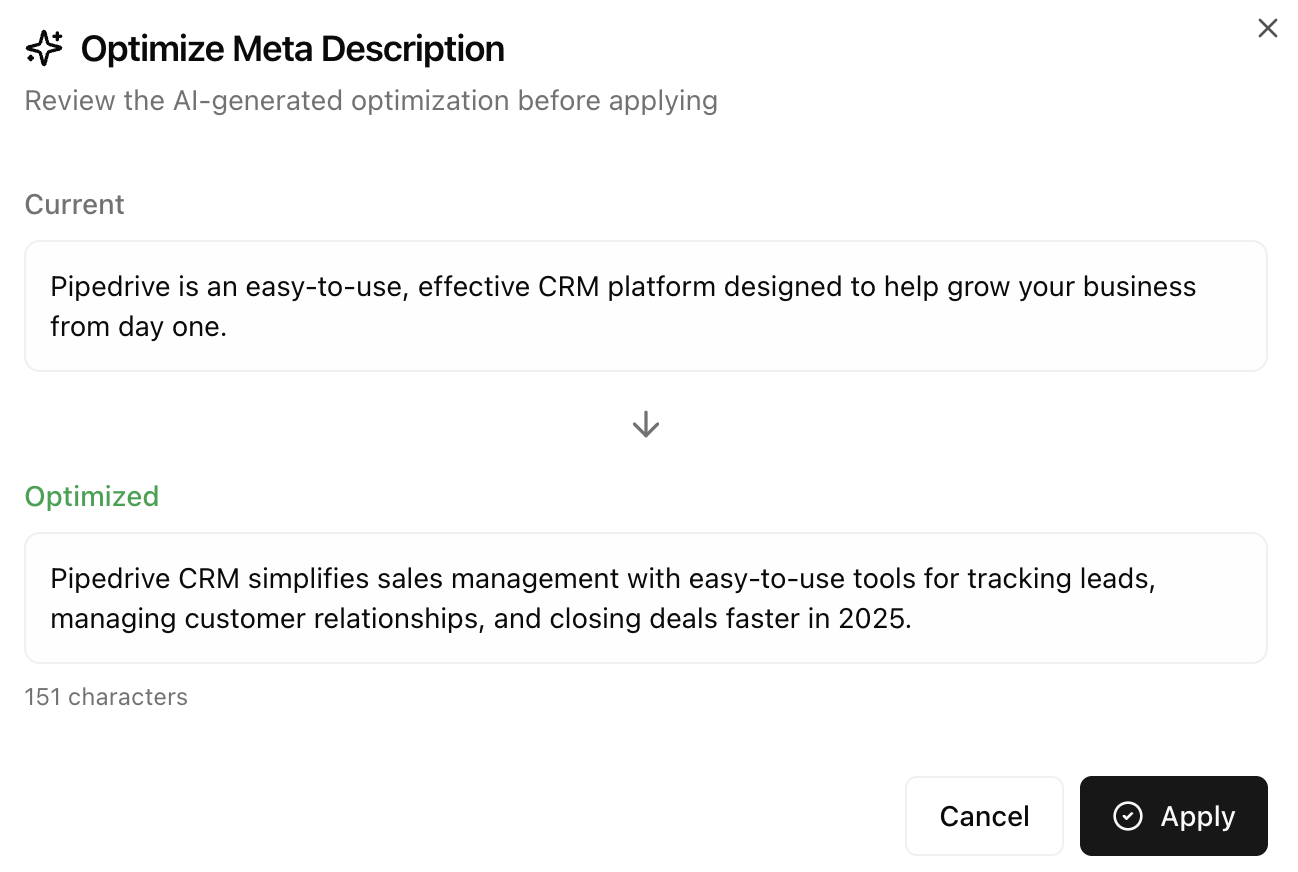 Click the wand icon to generate optimized alternatives. Better meta descriptions help AI understand what your page offers and when to cite it.
### URL / Slug
Shows your page URL with a **Clean** status indicator when the URL structure is SEO-friendly.
### Content
The full content AI extracts from your page. A status indicator shows whether your content length is optimal for comprehensive AI responses:
* **Optimal** - Good content length for authoritative answers
* **Too Short** - May lack depth for AI to cite
* **Too Long** - May dilute key messages
The character count and feedback help you understand exactly what to improve. Click the expand icon to view full content.
## Opportunities Tab
The Opportunities tab helps you maximize your page's reach across all relevant prompts.
Click the wand icon to generate optimized alternatives. Better meta descriptions help AI understand what your page offers and when to cite it.
### URL / Slug
Shows your page URL with a **Clean** status indicator when the URL structure is SEO-friendly.
### Content
The full content AI extracts from your page. A status indicator shows whether your content length is optimal for comprehensive AI responses:
* **Optimal** - Good content length for authoritative answers
* **Too Short** - May lack depth for AI to cite
* **Too Long** - May dilute key messages
The character count and feedback help you understand exactly what to improve. Click the expand icon to view full content.
## Opportunities Tab
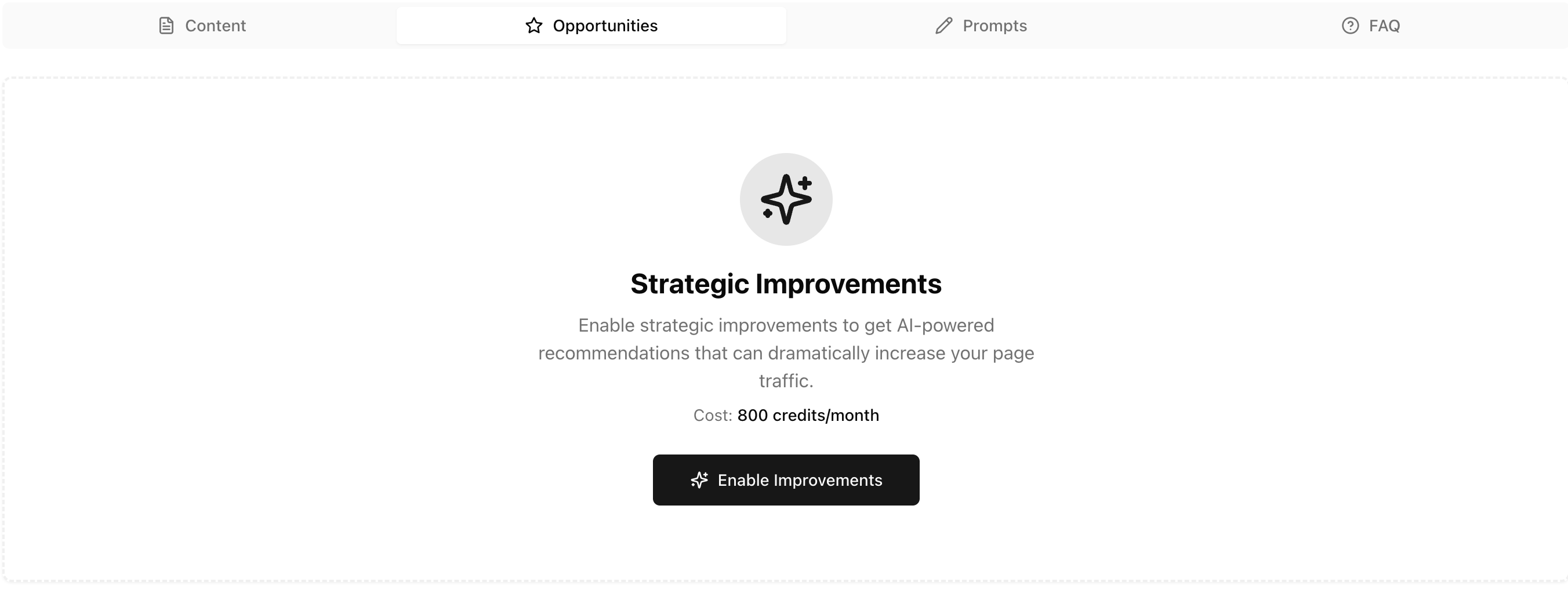
The Opportunities tab helps you maximize your page's reach across all relevant prompts.
 ### Strategic Improvements
Enable AI-powered recommendations to identify content gaps and expand your visibility. The goal: make your page the default answer for every relevant prompt.
**Example:** If your page covers "CRM for healthcare professionals", strategic improvements will help ensure you appear for:
* "best CRM for medical practices"
* "healthcare CRM software comparison"
* "patient management systems for clinics"
* Any other prompt where your content is relevant
Click **Enable Improvements** to activate continuous analysis. Cost is displayed in credits per month.
Once enabled, Attensira analyzes:
* Which related prompts you're missing
* What content gaps prevent you from ranking
* How to adjust your content to capture more traffic
## Prompts Tab
Shows which prompts cite this page as a source. Click any prompt to see the full [prompt results](/optimization/prompt/results).
| Column | Description |
| ------------------ | ------------------------------------------ |
| **Prompt** | The query that cited this page |
| **Position** | Your ranking in that response |
| **Share of Voice** | How much of the answer came from this page |
| **Sentiment** | How you were described |
## FAQ Tab
FAQs help AI engines provide direct answers from your content.
### Strategic Improvements
Enable AI-powered recommendations to identify content gaps and expand your visibility. The goal: make your page the default answer for every relevant prompt.
**Example:** If your page covers "CRM for healthcare professionals", strategic improvements will help ensure you appear for:
* "best CRM for medical practices"
* "healthcare CRM software comparison"
* "patient management systems for clinics"
* Any other prompt where your content is relevant
Click **Enable Improvements** to activate continuous analysis. Cost is displayed in credits per month.
Once enabled, Attensira analyzes:
* Which related prompts you're missing
* What content gaps prevent you from ranking
* How to adjust your content to capture more traffic
## Prompts Tab
Shows which prompts cite this page as a source. Click any prompt to see the full [prompt results](/optimization/prompt/results).
| Column | Description |
| ------------------ | ------------------------------------------ |
| **Prompt** | The query that cited this page |
| **Position** | Your ranking in that response |
| **Share of Voice** | How much of the answer came from this page |
| **Sentiment** | How you were described |
## FAQ Tab
FAQs help AI engines provide direct answers from your content.
 ### Page Metadata
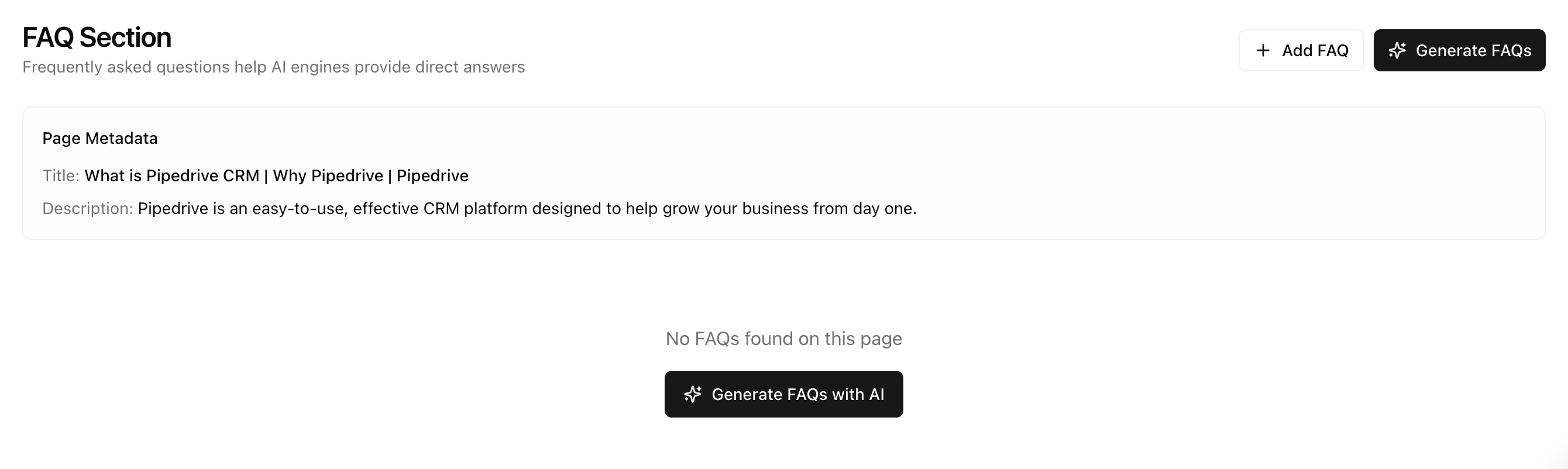
Shows your page title and description for context when generating FAQs.
### FAQ Management
| Action | Description |
| ----------------- | ------------------------------------------------ |
| **+ Add FAQ** | Manually add a question and answer |
| **Generate FAQs** | AI generates relevant FAQs based on your content |
### Why FAQs matter
AI models work by asking questions and finding answers. When your page directly answers common questions:
* AI is more likely to cite you
* Your content appears more authoritative
* You match the exact format AI prefers
### Generate FAQs with AI
Click **Generate FAQs with AI** to automatically create questions your page should answer:
* Questions AI commonly asks about your topic
* Questions your content partially answers
* Questions competitors answer that you don't
Use Studio to add FAQs to your page with proper formatting
## Next steps
Learn strategies to improve this page
See performance from the prompt perspective
### Page Metadata
Shows your page title and description for context when generating FAQs.
### FAQ Management
| Action | Description |
| ----------------- | ------------------------------------------------ |
| **+ Add FAQ** | Manually add a question and answer |
| **Generate FAQs** | AI generates relevant FAQs based on your content |
### Why FAQs matter
AI models work by asking questions and finding answers. When your page directly answers common questions:
* AI is more likely to cite you
* Your content appears more authoritative
* You match the exact format AI prefers
### Generate FAQs with AI
Click **Generate FAQs with AI** to automatically create questions your page should answer:
* Questions AI commonly asks about your topic
* Questions your content partially answers
* Questions competitors answer that you don't
Use Studio to add FAQs to your page with proper formatting
## Next steps
Learn strategies to improve this page
See performance from the prompt perspective